01 / What the screens show
Screen by screen
Captions to the module screens: briefly what each one shows and why.
- 01
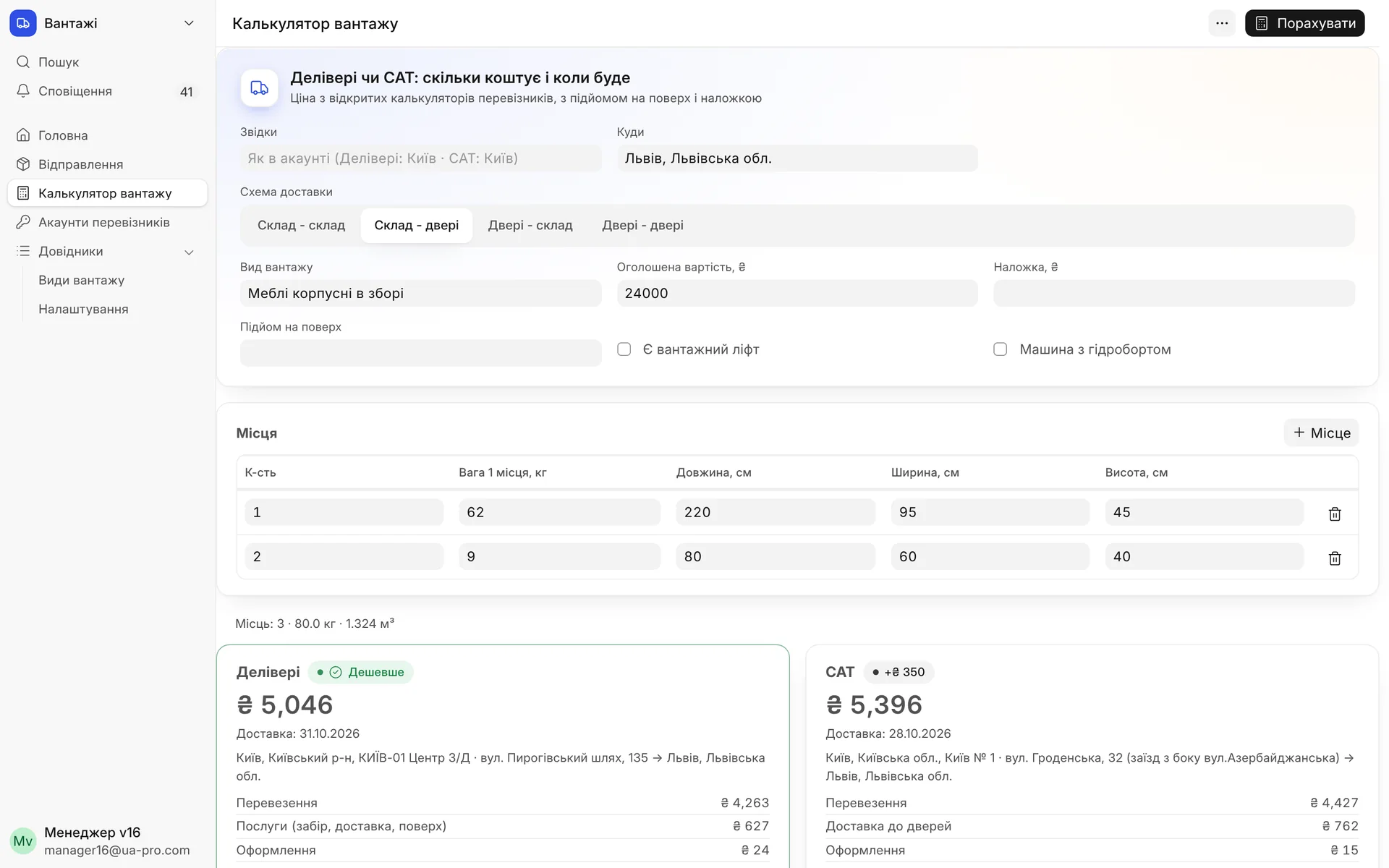
Freight calculator without an order: destination, delivery scheme, items with weight and dimensions. Two cards with price, timeframe, and breakdown, the cheaper one marked, so you can answer the client on the phone.
- 02
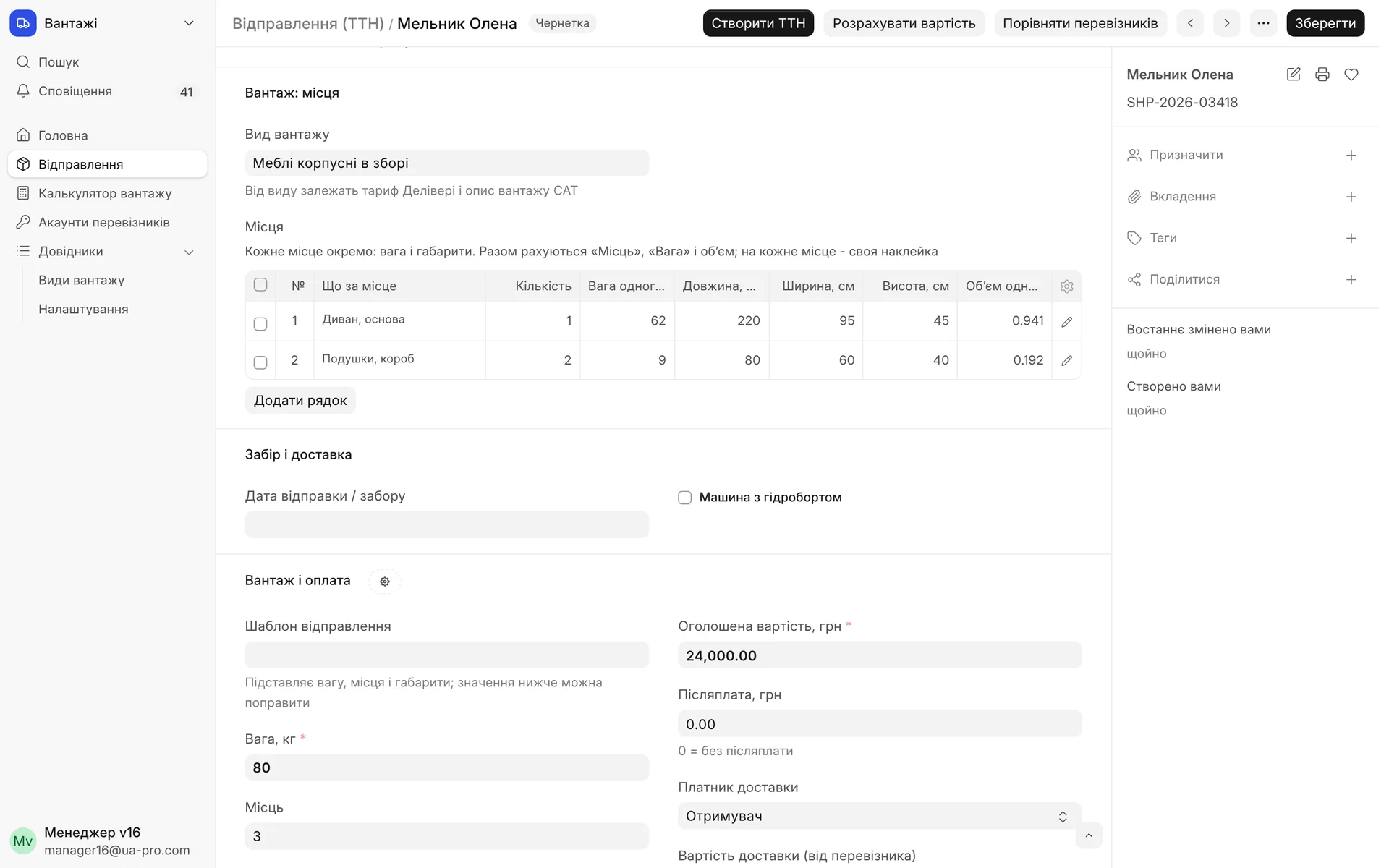
Items in the shipment: what the item is, quantity, weight, and dimensions. The number of items, total weight, and volume are calculated automatically, and each item gets its own label.
- 03
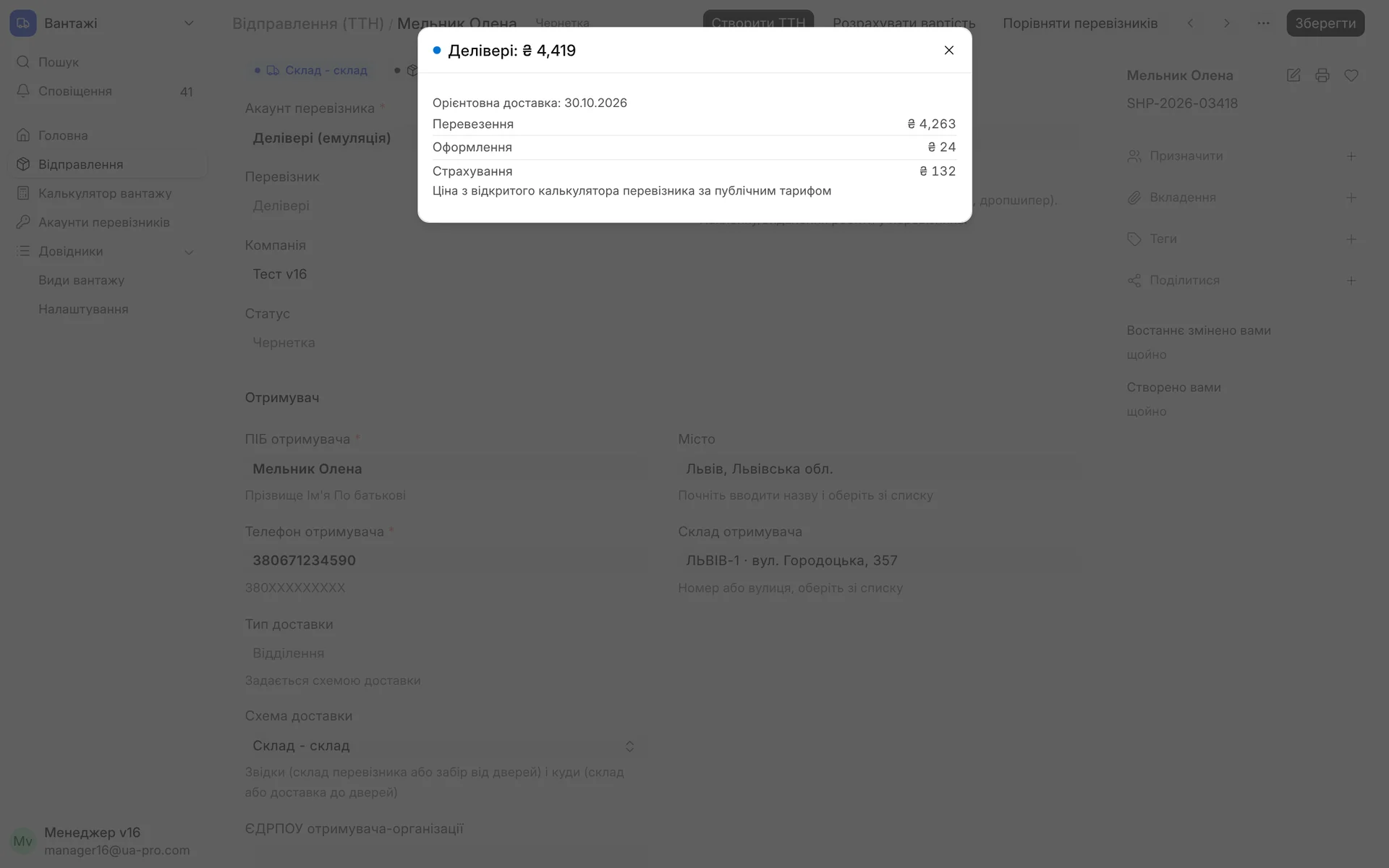
"Calculate cost" right in the draft: shipping, processing, insurance, and an estimated delivery date based on the carrier's calculator.
- 04
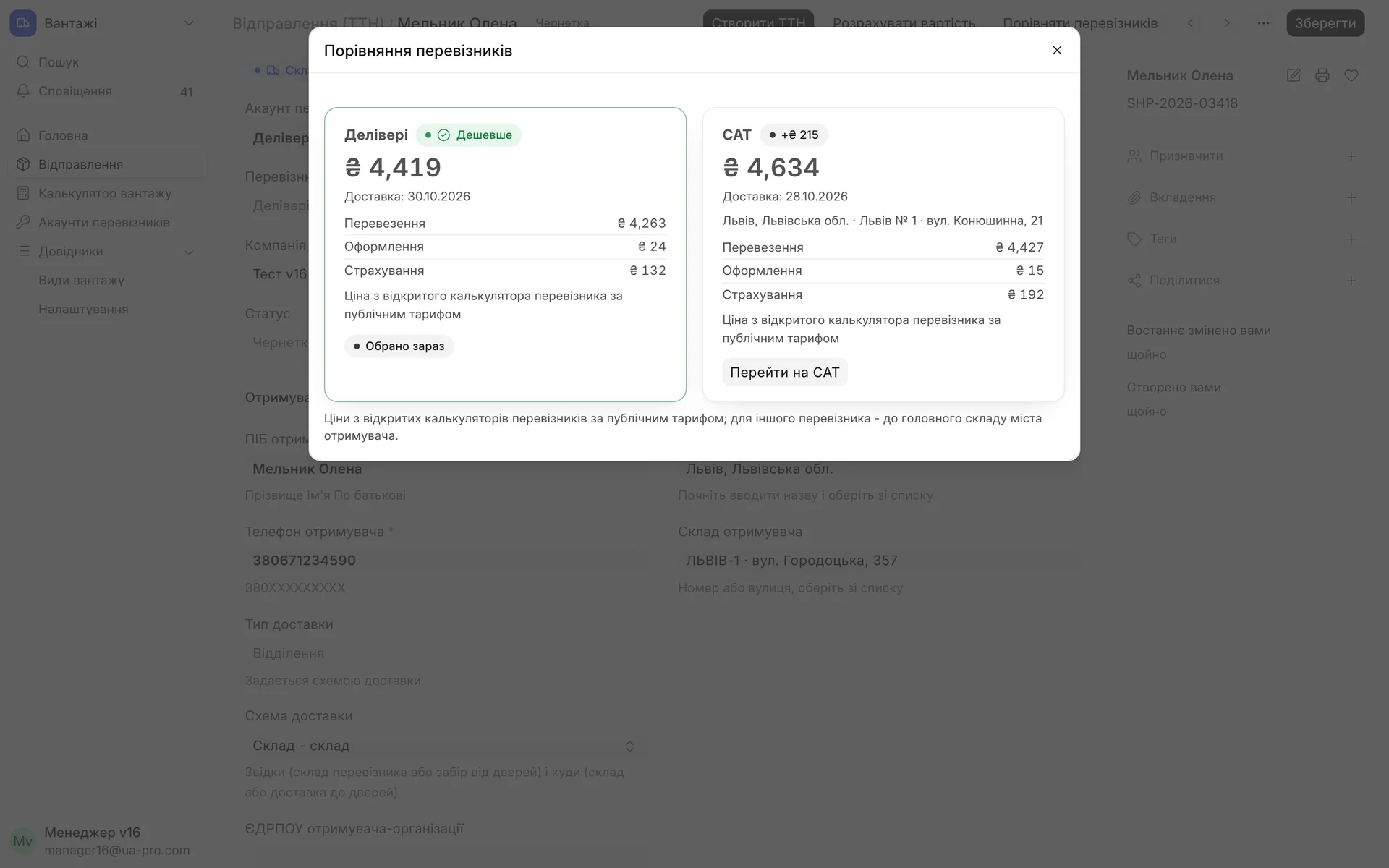
"Compare carriers": Delivery and SAT side by side, the difference in hryvnias and the timeframe. The "Switch to SAT" button switches the shipment and automatically picks the city and warehouse.
- 05
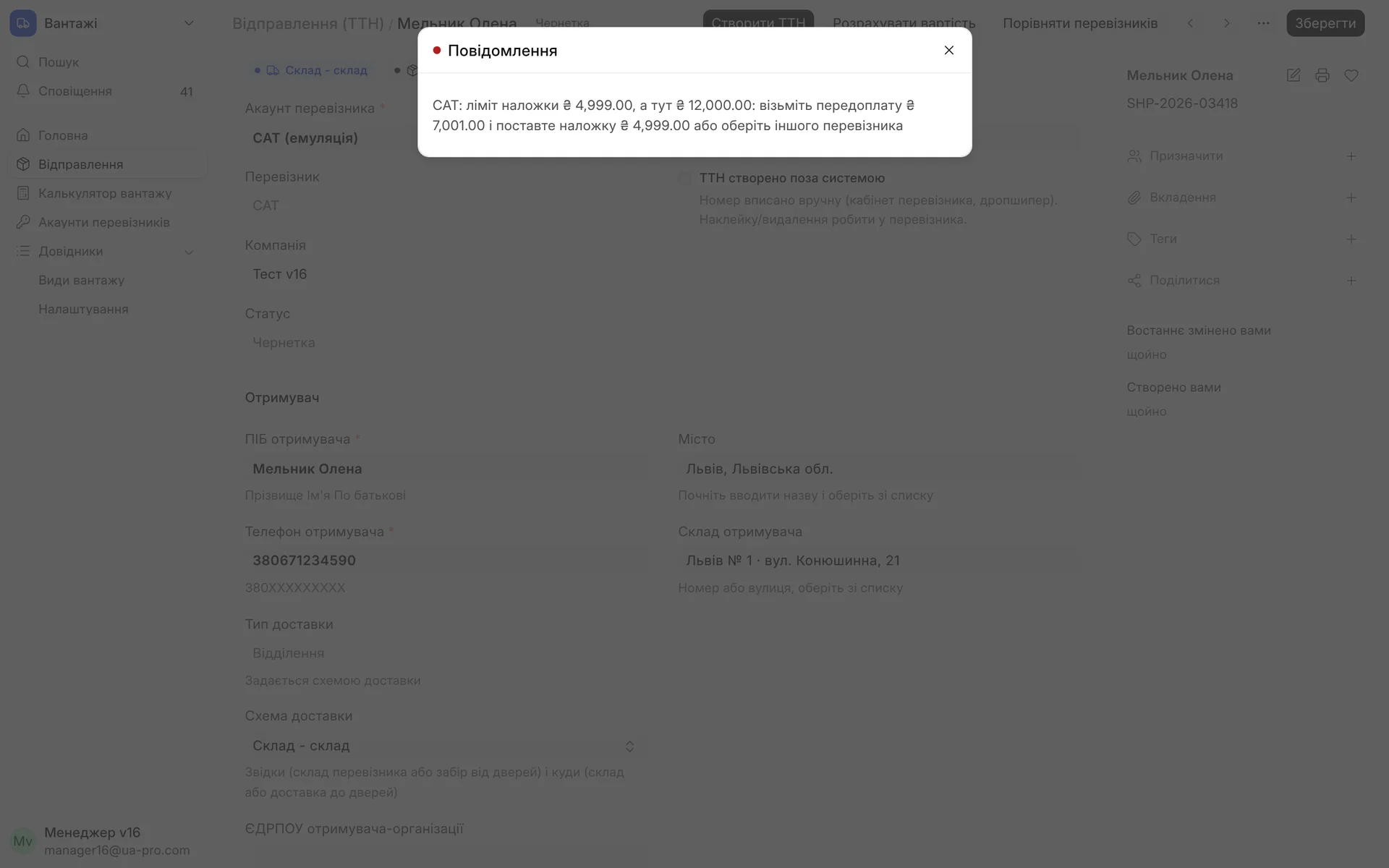
Cash on delivery (COD) amount exceeds the carrier's limit: the waybill is not created, and the ERP states what amount to take as a prepayment or which carrier will accept that COD amount.
- 06
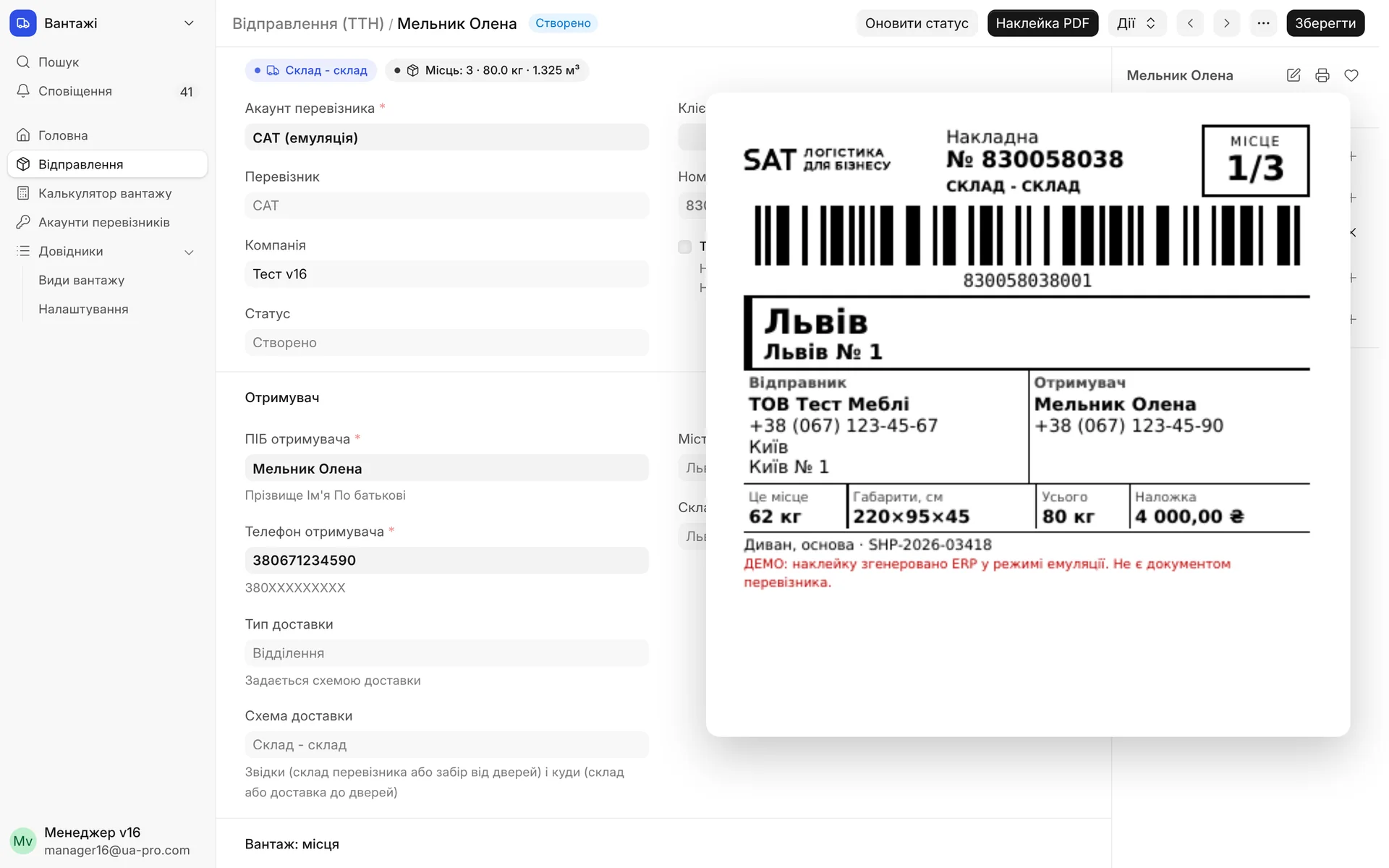
Waybill created: a label for each item with the waybill number, recipient, dimensions, and COD amount. After the waybill is created, freight fields can no longer be changed by accident.
02 / How it works
From order to a label for every item
- 01
Scheme and items
In the shipment, the manager selects a Delivery or SAT account and the delivery scheme. Freight items are entered in a table: what it is, quantity, weight, and dimensions. The number of items, weight, volume, and the largest item are calculated automatically.
- 02
Checks before the waybill
The carrier's COD limit, item weight and dimensions against warehouse limits, the address and floor for door delivery, and the recipient's full name and phone number are all checked while still in the draft. If something is wrong, you see the reason and what to do.
- 03
Price and carrier
"Calculate cost" shows the price with a breakdown: shipping, services, processing, insurance. "Compare carriers" puts Delivery and SAT side by side, marks the cheaper one, and switches the shipment with one click.
- 04
Waybill and statuses
"Create waybill" gets a number from the carrier and attaches a PDF with a label for each item ("Item 2 of 5"). Delivery statuses update on the card, and freight fields can no longer be changed by accident after the waybill is created.
03 / Delivery schemes
Warehouse or door on either side
The scheme sets the delivery type automatically, so the manager doesn't need to remember which box to check for door delivery.
- 01
Warehouse to warehouse
The cheapest option: the sender brings the freight to the carrier's warehouse, and the client picks it up from a warehouse in their own city. The warehouse is selected from the carrier's directory with the address.
- 02
Warehouse to door
Delivery to the client's address: street, building, apartment, floor, whether there's a freight elevator, and whether unloading is needed. The lift-up price is calculated according to the carrier's rules.
- 03
Door to warehouse
The carrier picks up the freight from your address on the chosen date, and the client receives it at the warehouse. The pickup address is saved in the account and filled in automatically.
- 04
Door to door
Pickup from you and delivery to the client under a single waybill. For heavy items, you can order a vehicle with a hydraulic lift gate.
04 / What the ERP checks
What would otherwise only come up at the carrier's warehouse
COD limit: Delivery and SAT have different cash on delivery (COD) limits; a larger amount won't let you create the waybill, and the ERP immediately suggests how much to take as a prepayment
COD to the door: Delivery doesn't accept cash on delivery for door delivery: the ERP explains this before the waybill and suggests a prepayment, a warehouse scheme, or SAT
Warehouse limits: weight and dimensions of each item against the branch's limits: small partner pickup points accept less than the main warehouse
Floor without an elevator: SAT only carries items up to a floor using a freight elevator and only light items, while Delivery calculates the lift-up by weight: both rules are visible in the price and the hint
Protection after the waybill: once the waybill is created, the scheme, items, and services can't be changed: to modify the freight, the waybill must be deleted at the carrier and a new one created
City and warehouse from the directory: the recipient's and sender's city and warehouse are selected from the carrier's directory, not typed as free text, so the waybill won't fail because of a typo
05 / For the manager
Calculator, freight types, comparison
- 01
Freight calculator
A separate page without an order: origin, destination, scheme, items, floor, COD. Two cards with price, timeframe, and breakdown, so you can answer the client on the phone within a minute.
- 02
Freight types
A directory of "Assembled cabinet furniture," "Mattresses," "Doors," "Glass," and others mapped to Delivery's category and SAT's description. Custom types can be added from the carriers' directories with a button.
- 03
Comparison in the draft
The other carrier's price is calculated to the main warehouse in the recipient's city, and when switching, the ERP automatically picks the city and warehouse of the new carrier.
- 04
Labels for every item
A PDF with a label for each item: waybill number, recipient, city, and item number out of the total. The client's order number is printed on the waybill.
Module limits
Prices in the comparison and calculator are taken from the carriers' public calculators at the public rate: if you have contract rates, the final amount will be in the waybill. Live waybills require API keys from Delivery and SAT accounts; without them, the module runs in demo mode with real directories and prices.
06 / About the module
Freight Shipping: Delivery and SAT
Delivery and SAT waybills from the same shipment as Nova Poshta: four schemes (warehouse or door on either side), each item entered separately with weight and dimensions, floor lift-up, freight elevator, hydraulic lift gate, door pickup. Before creating the waybill, the ERP checks the carrier's cash on delivery (COD) limit and suggests a prepayment, warehouse limits, and the door address. "Compare carriers" calculates the price and timeframe for both using their own calculators and switches the shipment to the cheaper one. A freight calculator without an order, a label for each item, and statuses in the order.
Area: Sales and shipping. The module is switched on and off for each company separately, with no per-seat licences.
07 / Questions and answers
About "Freight Shipping: Delivery and SAT"
How is this module different from the "Shipping" module?
"Shipping" handles Nova Poshta, Ukrposhta, Meest, and Rozetka Delivery. "Freight Shipping" adds Delivery and SAT to the same shipment document, with freight items, warehouse or door schemes, floor lift-up, and price comparison. The shipment list, templates, and statuses are shared.
What happens if the COD amount exceeds the carrier's limit?
The waybill won't be created, and the card will show a clear reason: the carrier's limit and how much to take as a prepayment. The warning appears as soon as the draft is saved, so the manager sees it before discussing payment with the client.
How do I calculate delivery of a sofa with a lift-up to the 5th floor?
In the shipment or in the calculator, choose the "Warehouse to door" or "Door to door" scheme, specify the floor, and whether there's a freight elevator. The ERP will show the price for both carriers, and if one of them won't carry it up without an elevator, it will state that on the card.
Can one order be shipped as several items?
Yes, each item is entered separately with weight and dimensions, and identical items can go in one row with a quantity. Each item gets its own printed label.
Can I try it without API keys?
Yes. An account marked "Emulation" uses the real city and warehouse directories and the real calculators of both carriers, and creates waybills and labels marked "DEMO."
Updated:
08 / Other modules
More modules on video
The same, on your data.
The screens were captured on a demo company. Send us a sample document or order and we will show this module on it.