01 / What the screens show
Screen by screen
Captions to the module screens: briefly what each one shows and why.
- 01
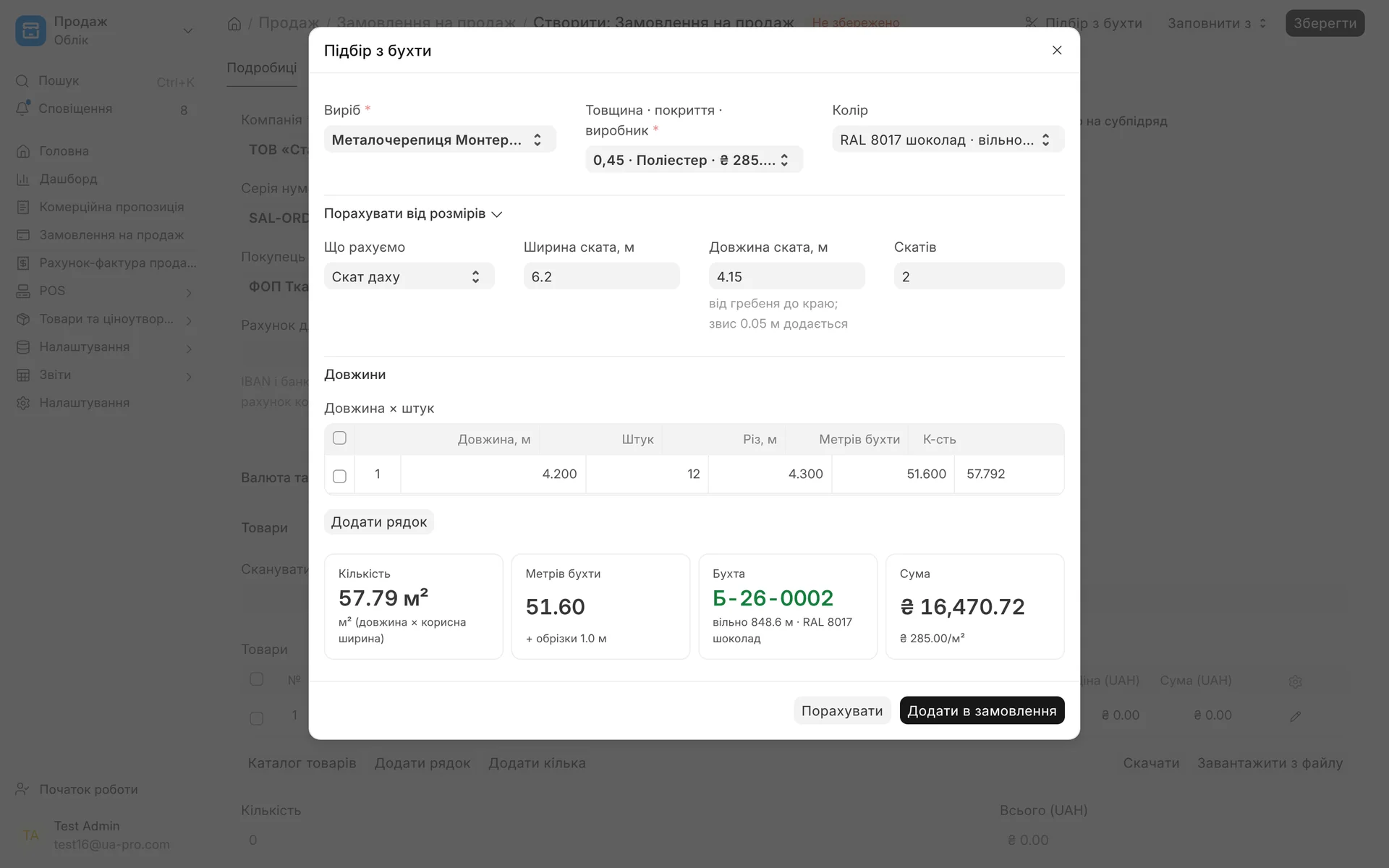
Selection from a coil in the order: the manager enters the width and length of the roof slope, the system calculates the sheets, rounds the cut to the corrugation pitch, picks a coil of the right colour by itself and shows the amount.
- 02
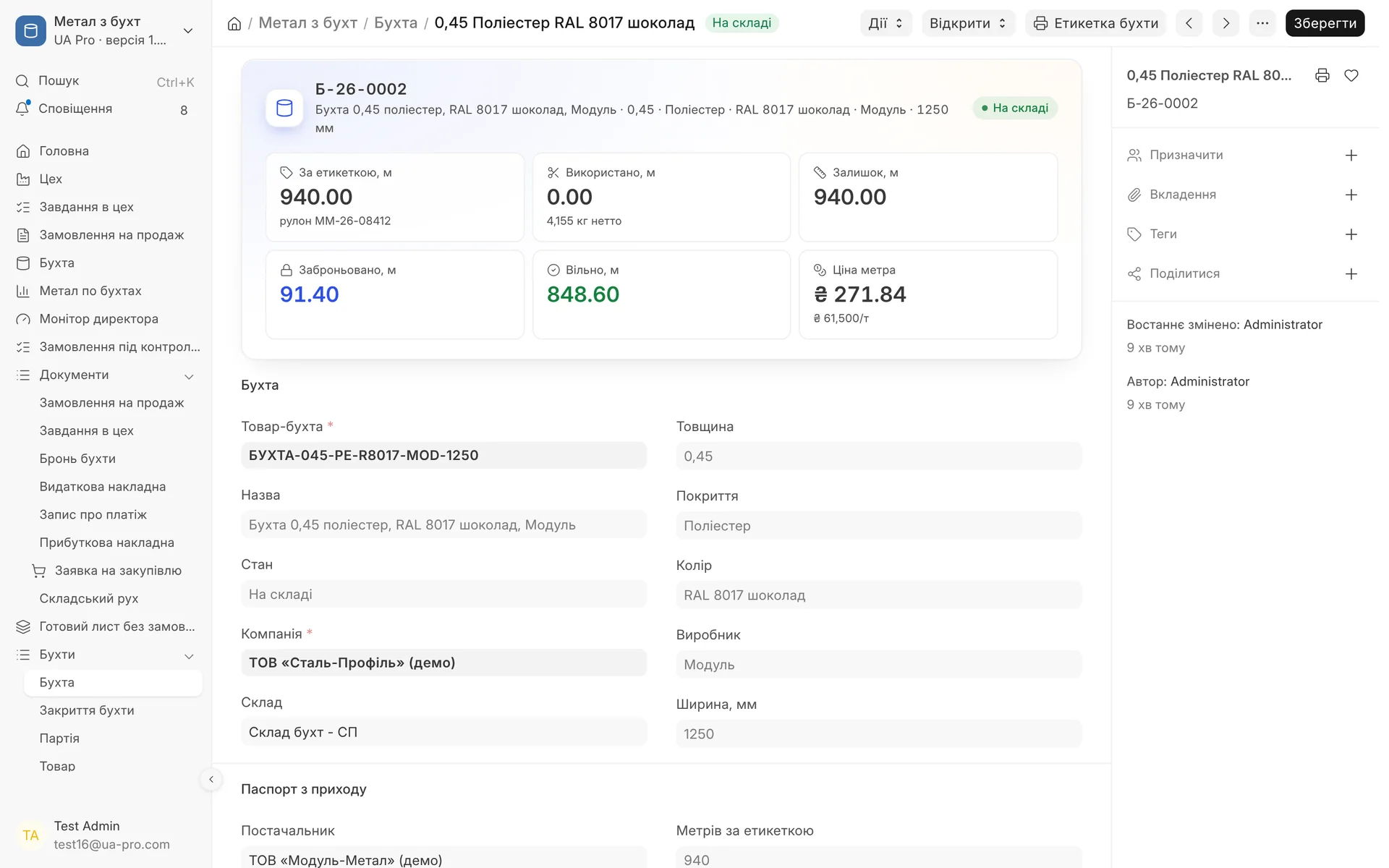
Coil passport: metres per label, roll, net weight, used, remaining, reserved and free, the price per metre from the price per tonne.
- 03
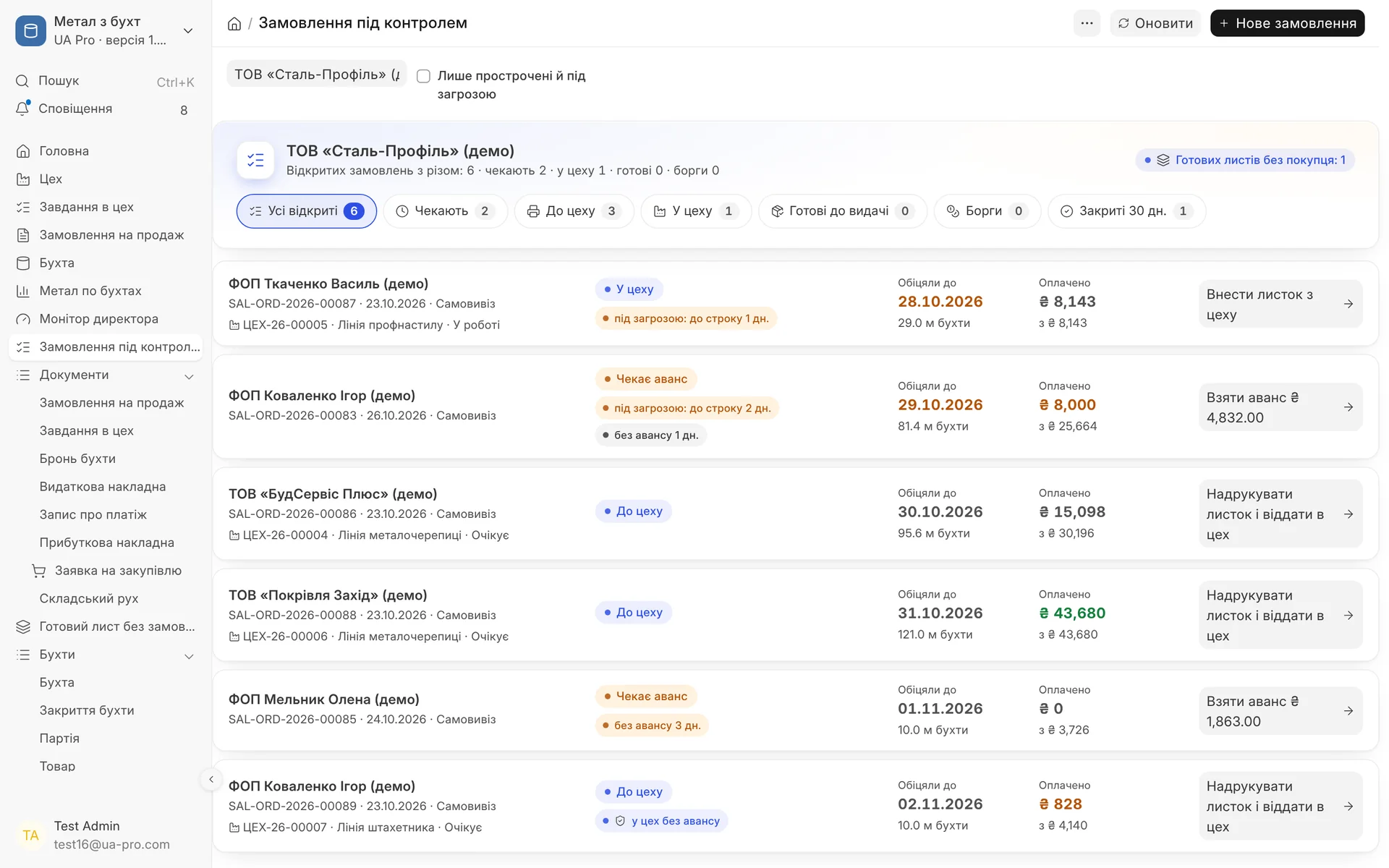
Orders under control: tabs by stage, "at risk", "no advance" and "to workshop without advance" flags, and on the right one button with the next step.
- 04
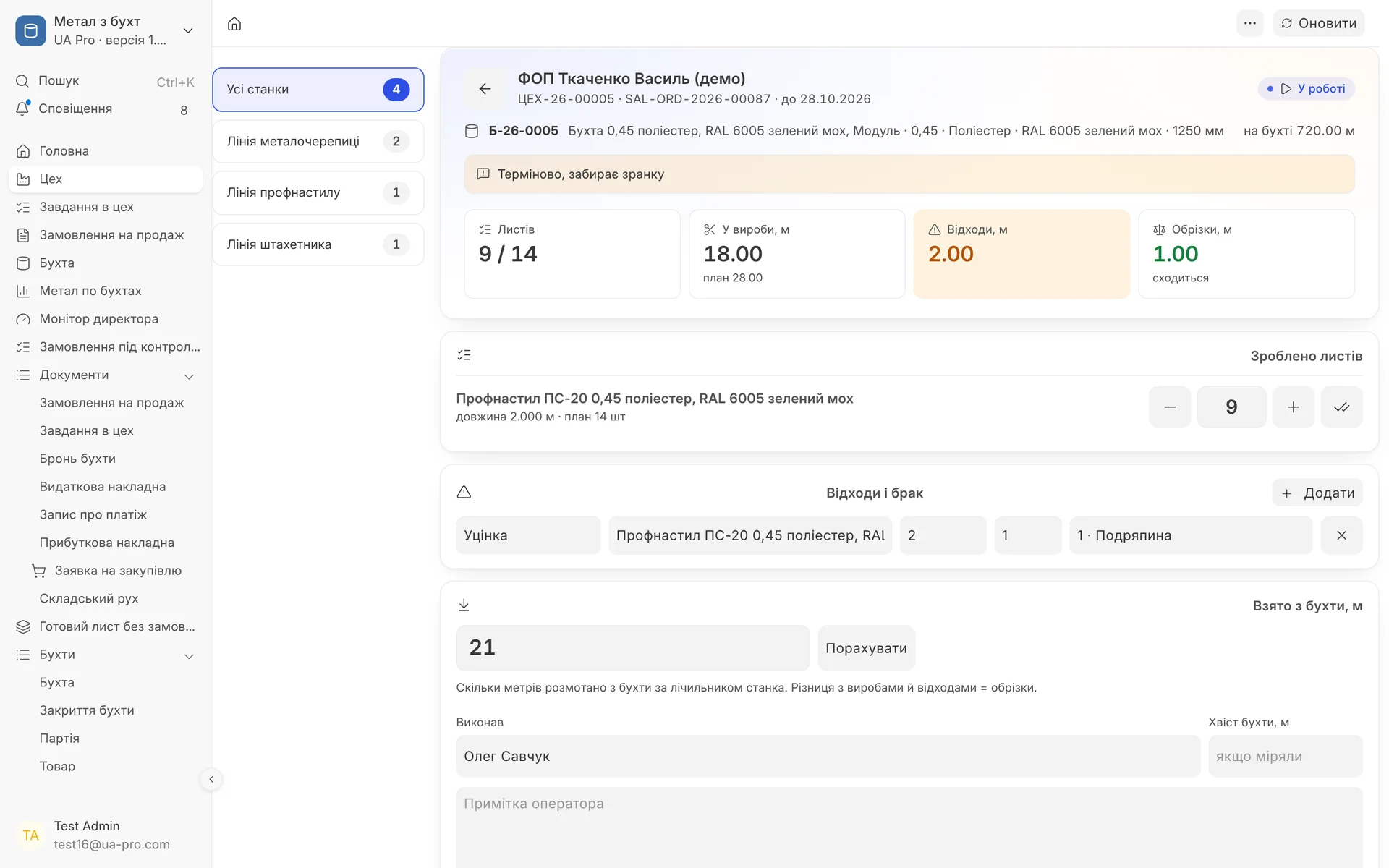
Workshop screen for the operator: how many sheets are done out of the plan, waste with a reason, metal taken from the coil by the machine counter and a balance that shows whether everything adds up.
- 05
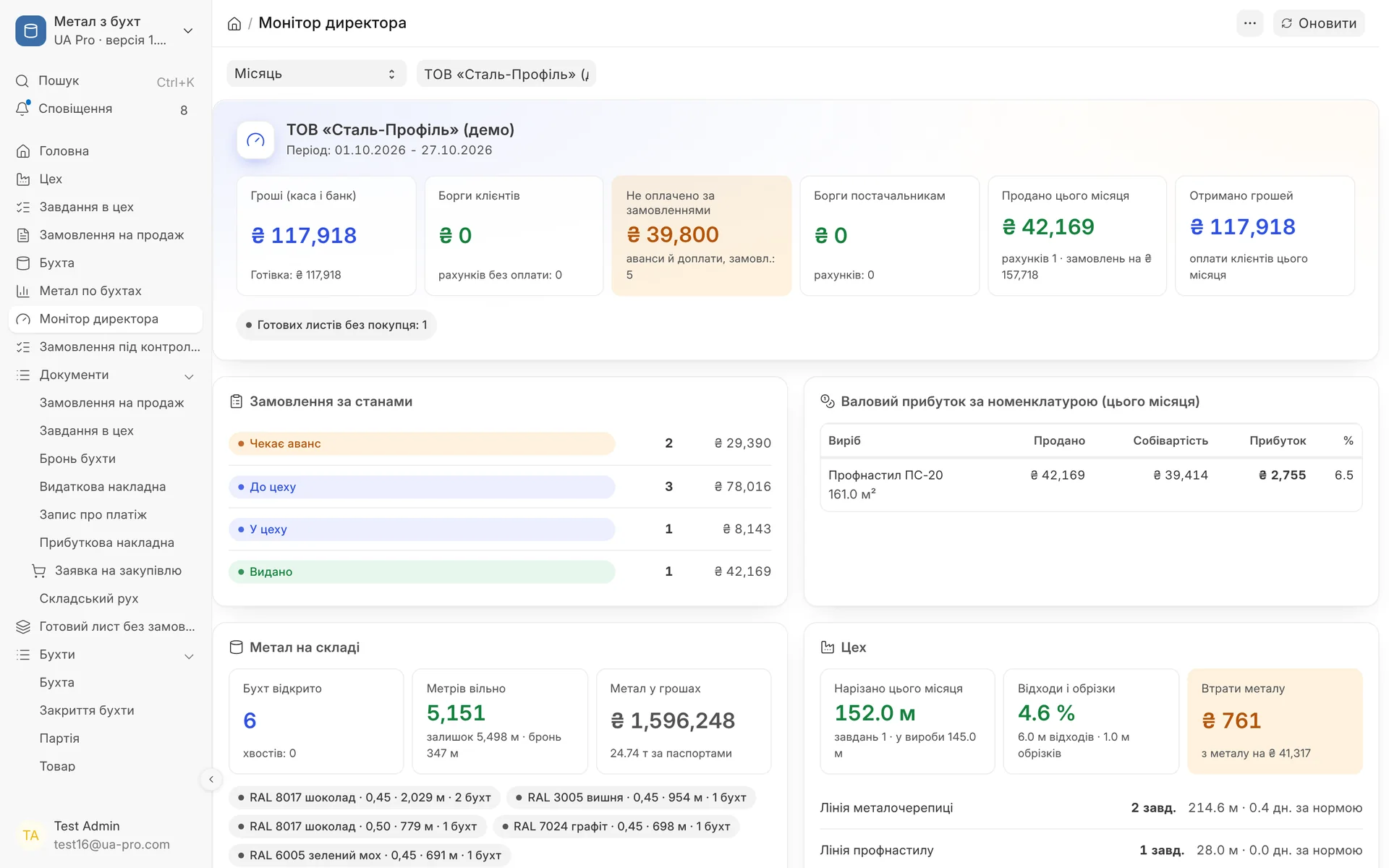
Director's monitor: money, unpaid amounts on orders, orders by state, gross profit by product, metal in stock by colour and machine load.
- 06
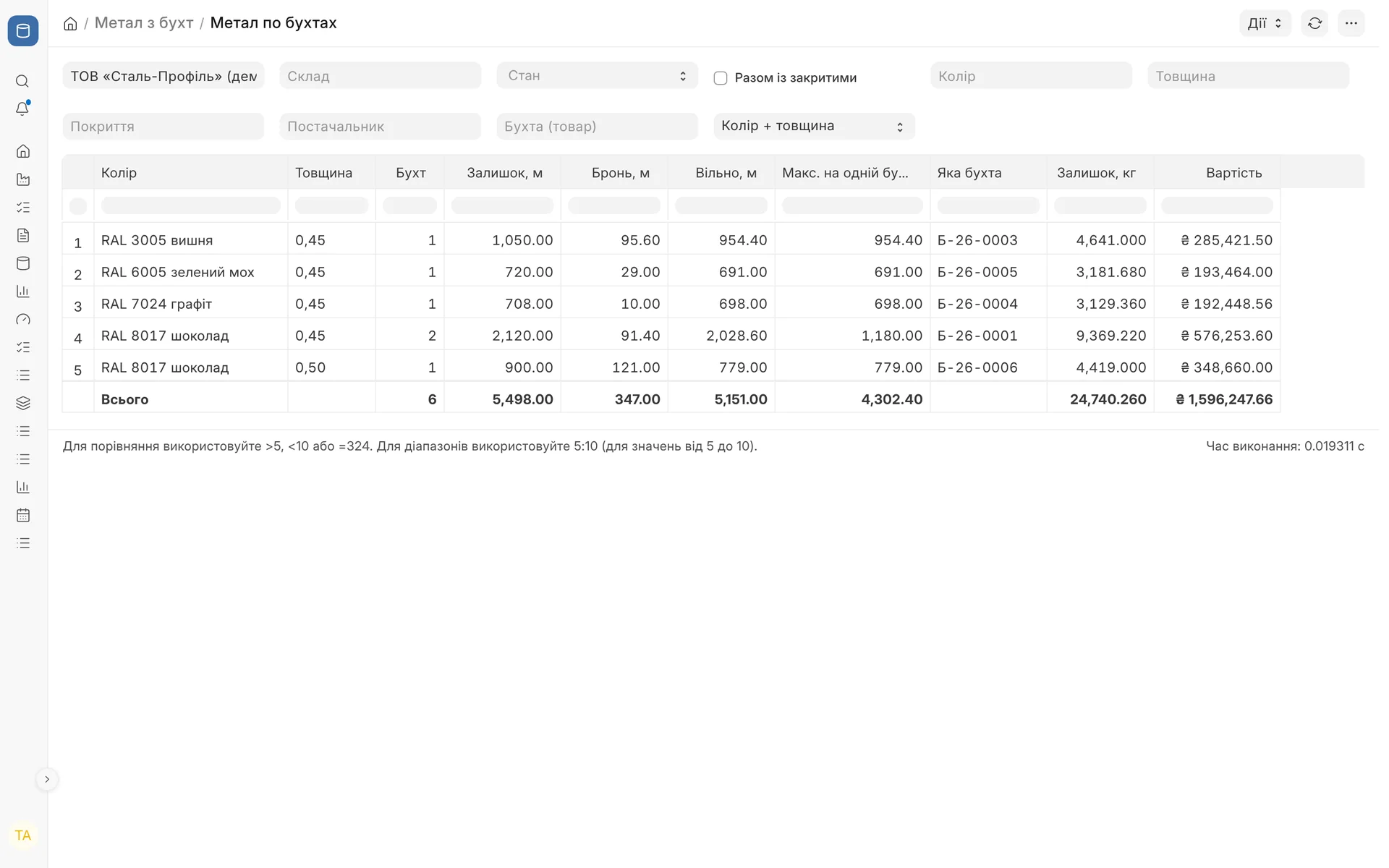
Metal by coil: remaining, reserved and free metres by colour and thickness, the maximum on a single coil, the weight and value of metal in stock.
02 / How it works
From a coil in the warehouse to sheets in the customer's vehicle
- 01
Coil receipt
A line of the purchase receipt becomes a coil with a passport: colour, thickness, coating, manufacturer, width, coil No., metres per label, net weight and price per tonne. The price per metre is calculated automatically. You can photograph the label, and the fields are filled in from the photo.
- 02
Selection in the order
The "Pick from coil" (Підбір з бухти) button: product, variant, colour, lengths and number of sheets. The calculator works out a roof slope or a fence, the cut length is rounded to the corrugation pitch, and accessories are suggested by norm, for example screws per m².
- 03
Booking and advance
A submitted order books the metres, including offcuts, on a specific coil. Without an advance payment the booking is released after a set number of days. After the advance, the shop job is created automatically, without an advance only with the director's permission.
- 04
Shop and handover
The operator sees the job on the shop screen and marks finished sheets, defects and the coil tail. "Finish" writes off the metal and puts the products into stock. The customer can get an SMS that the order is cut, and the delivery note is posted only after full payment.
03 / Coil and order
Every metre of metal in its place
Cutting rules are set on the product template, colours and thicknesses on the coil. The manufacturer configures everything to fit its own product range.
- 01
Live coil balance
Balance, booked, available, used and the value of the balance in metres and hryvnias. Coil state: in stock, in work, tail, closed.
- 02
Automatic coil selection
When the order is saved, lines without a coil get the smallest sufficient coil of the right colour, thickness and coating. Where possible, one order is cut from a single coil.
- 03
Cutting rules on the product
Machine, corrugation pitch and offset, minimum and maximum length, fixed length for flashings, number of pieces from the coil width, kilograms per metre.
- 04
Waiting for metal
If the required colour is not available, the order is submitted with the state "Waiting for metal", and a purchase request for a coil of that colour is created automatically. Once it arrives, lines are matched automatically, oldest orders first.
- 05
Ready sheets
Markdown sheets from cutting and surplus beyond the job become ready sheets in stock. Selection in the order suggests taking a ready sheet of the right colour and length instead of a new cut.
- 06
Pickup and weight
Self-pickup, own transport or a freight carrier with a tracking link. The order weight is calculated from the coil's kilograms per metre, and long sheets are marked as long-length.
04 / Paperless shop
The shop screen on a phone or tablet
- 01
Jobs by machine
Job cards by due date for each machine, an "urgent" mark for handover today or tomorrow, and overdue jobs are visible right away.
- 02
Sketch and note
The customer's sketch or drawing and the manager's note from the order open full screen on the phone. The profile drawing from the product card is also on the screen and on the slip.
- 03
Output, defects, markdowns
A sheet counter, waste with a reason (markdown or defect), "Taken from coil" from the machine counter. The balance shows whether what was taken matches products, waste and offcuts.
- 04
Re-cutting defects
A defect or short cut immediately creates a "Re-cut" job from a coil of the same colour, first in the queue. The order does not become "Cut" until the re-cut is done, so the customer is not told "ready" too early.
- 05
Cost in money
Products are put into stock at the cost per metre of the coil, markdowns go to a separate warehouse at a discount, defects go to scrap by the kilogram, and the difference goes to the losses account.
- 06
Shop slip with QR
If the shop prefers paper, the slip is printed with mm, the planned pieces, cells for actual output and defects, a sheet layout diagram and a QR code for this job's screen.
05 / Control for the owner
Director's monitor, orders under control and reports
Director's monitor: money, debts of customers and to suppliers, orders by state, gross profit by product, metal by colour, shop workload, waste and alerts
Orders under control: tabs by stage with counters, "overdue", "at risk", "no advance", "debt" marks and one "what to do now" button
Metal by coil and coil card: balances by colour and thickness, the maximum on a single coil, all events of one coil from receipt to closing
Machines and workload: plan and actual by machine and operator, metres per hour and per shift, the queue by day against the daily norm
Waste and defects: by machine, operator, colour and reason, together with shortages and scrap when coils are closed
Closing a coil: the measured balance against documents: a shortage goes to losses, the tail goes to scrap, is written off or stays in stock
Module limits
The module tracks metal, cutting and handover, but it does not control the machine or read its counter: the operator enters the actual output. Reading the coil label from a photo works through the UA Pro AI service and is enabled on request. The advance, booking period, allowed offcuts, scrap price and the director role are set by the manufacturer in the module settings.
06 / About the module
Coil metal: cutting, workshop, reservation
A passport for every coil from receipt, item selection in the order with rounding to the corrugation pitch and automatic coil selection, reservation of metres, an advance payment or director's approval, paperless workshop tasks with actuals, markdowns and defects, re-cutting of defects straight in the queue, leftover picket fence strips to the warehouse as remnants, release after payment, closing a coil with shortage and scrap, reports by coil, waste and machine.
Area: Manufacturing. The module is switched on and off for each company separately, with no per-seat licences.
07 / Questions and answers
About "Coil metal: cutting, workshop, reservation"
How does the system know how many metres are left on a coil?
The coil is linked to stock accounting: a receipt adds metres, and each finished shop job writes off what was taken from the coil. Bookings for orders are counted separately, so you see both the physical balance and the available metres.
Can an order go to the shop without prepayment?
Yes, with the director's permission in the order or if the customer card has "to the shop without advance" under the contract. Separately, the director can allow handover without payment. Who gave the permission and when is recorded, and the manager cannot change it.
What if the required colour is not in stock?
You can still submit the order. It gets the state "Waiting for metal", and a purchase request for a coil of that colour is created automatically. When the coil arrives, the order picks it automatically.
Does a shop operator need a computer?
No, the shop screen is made for a phone or tablet. The operator sees jobs, sketches and notes, but orders with prices are not opened to them. If it is more convenient, the shop slip is printed with a QR code for this job.
How are defects and offcuts calculated?
The operator marks defects with a reason, and offcuts from machine setup are calculated from the balance of metal taken. A defect immediately creates a re-cut, and the "Waste and defects" report shows metres and money by machine, operator and reason.
Is the module suitable for picket fencing and flashings, where several pieces are cut from the width?
Yes, the number of pieces from the coil width is set on the product. Extra strips from an incomplete pass go to stock as remnants, and the cost of the metal is split across all strips, so the ordered product does not get more expensive.
Updated:
08 / Other modules
More modules on video
The same, on your data.
The screens were captured on a demo company. Send us a sample document or order and we will show this module on it.