01 / What the screens show
Screen by screen
Captions to the module screens: briefly what each one shows and why.
- 01
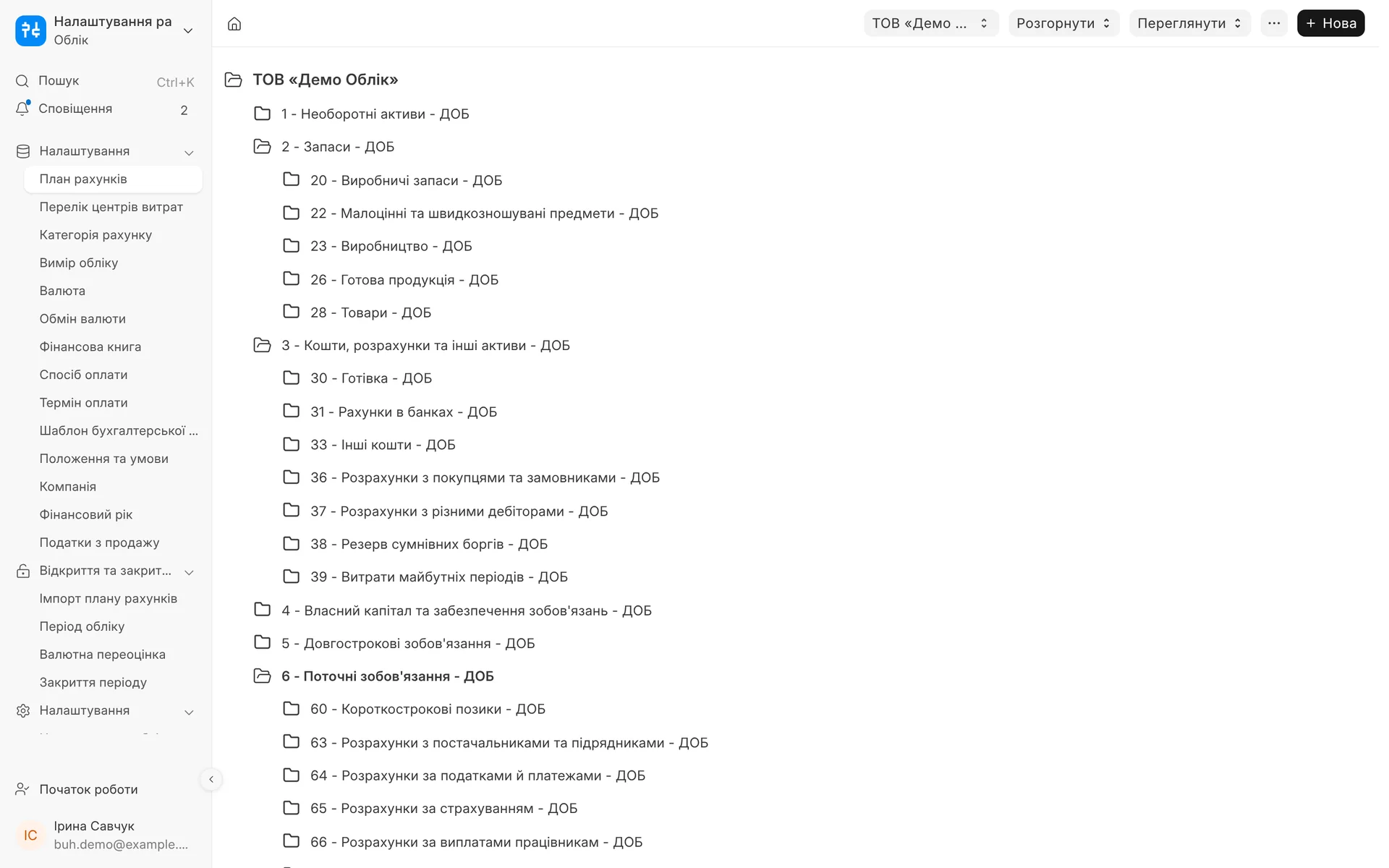
Chart of accounts under Order No. 291: classes and sub-accounts in Ukrainian, from inventory and cash to current liabilities.
- 02
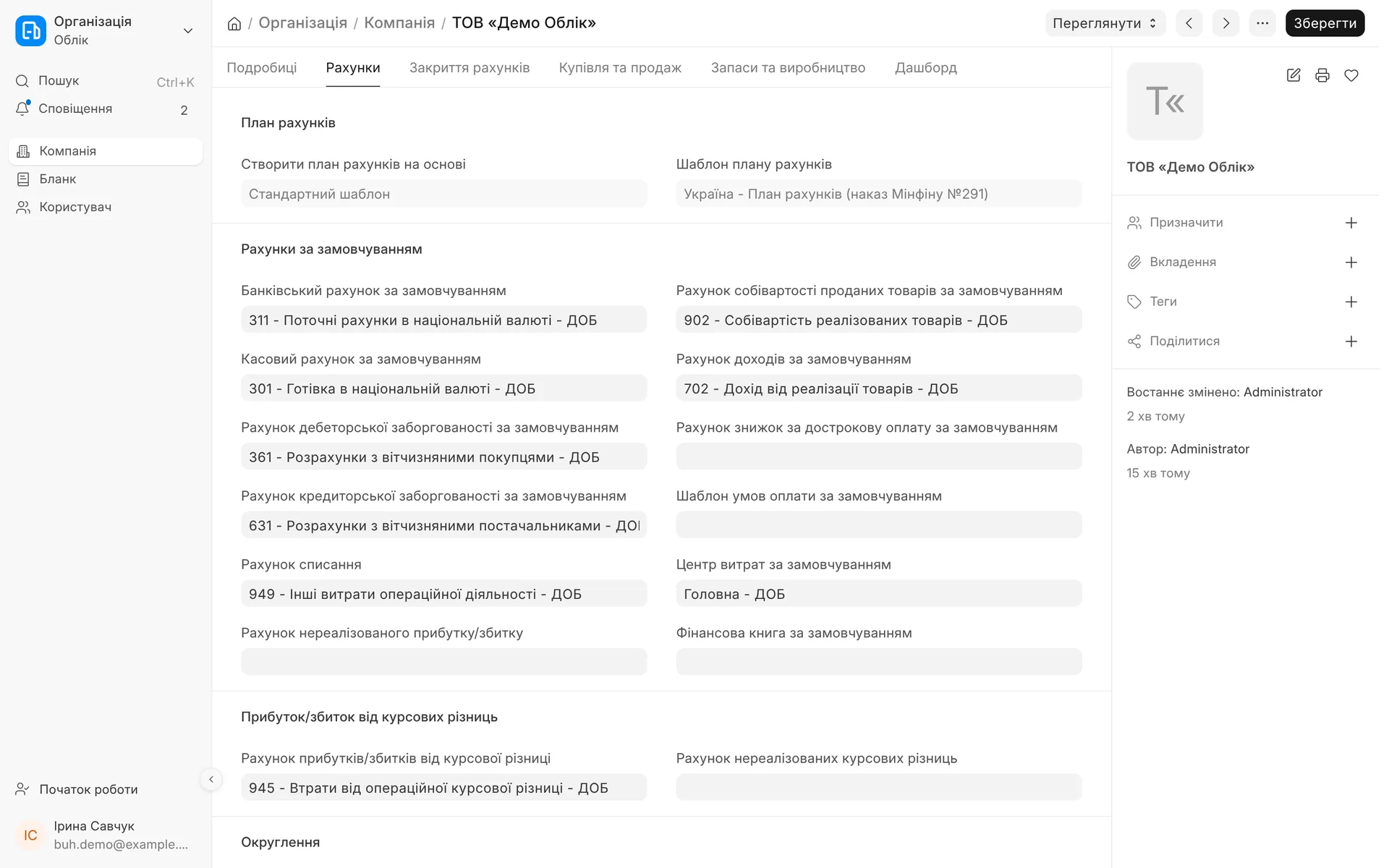
Default accounts are filled in automatically: bank 311, cash 301, customers 361, suppliers 631, income 702, cost of sales 902.
- 03
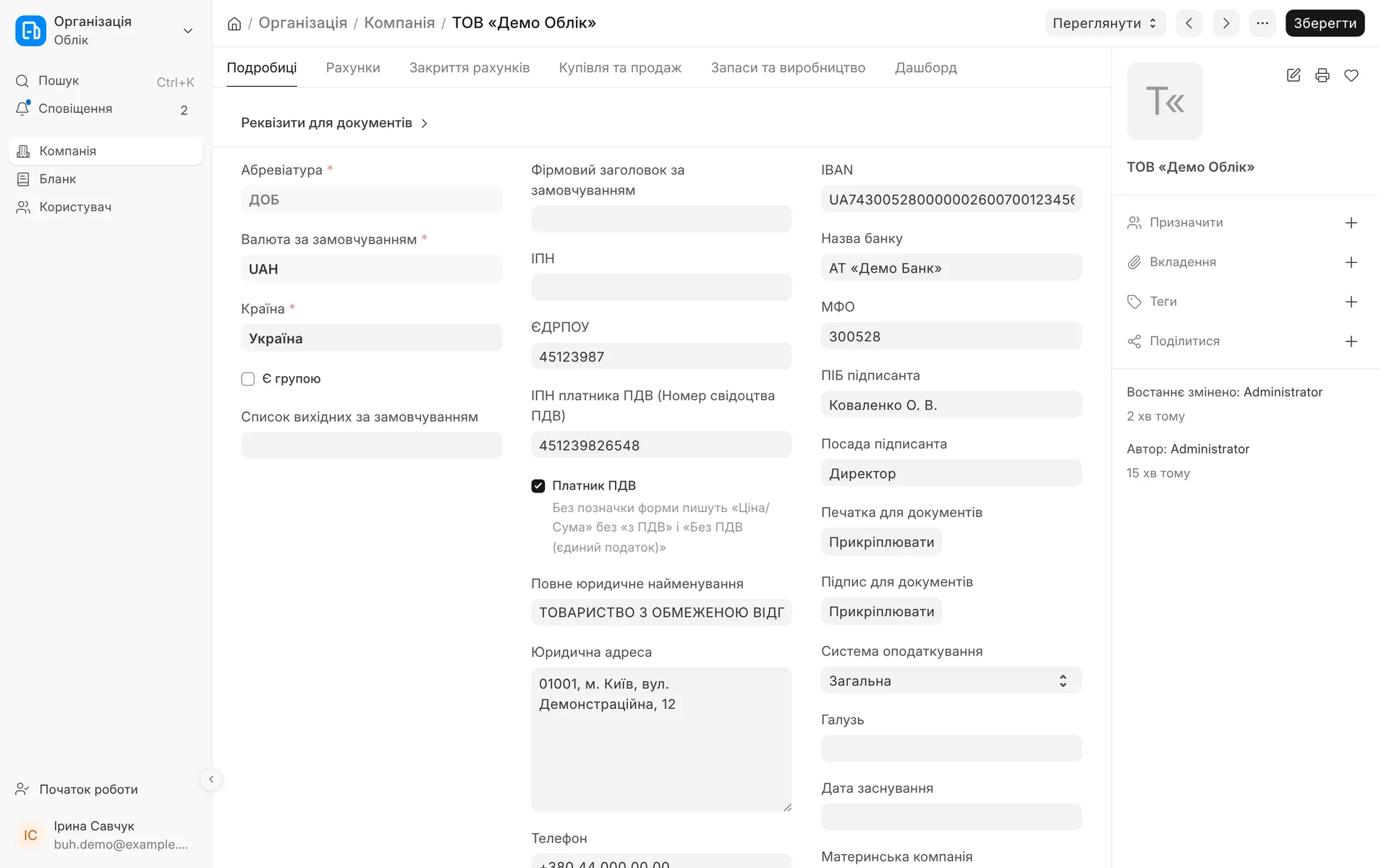
Company details: EDRPOU, tax ID (IPN), legal address, the "VAT payer" flag and the tax system for print forms.
- 04
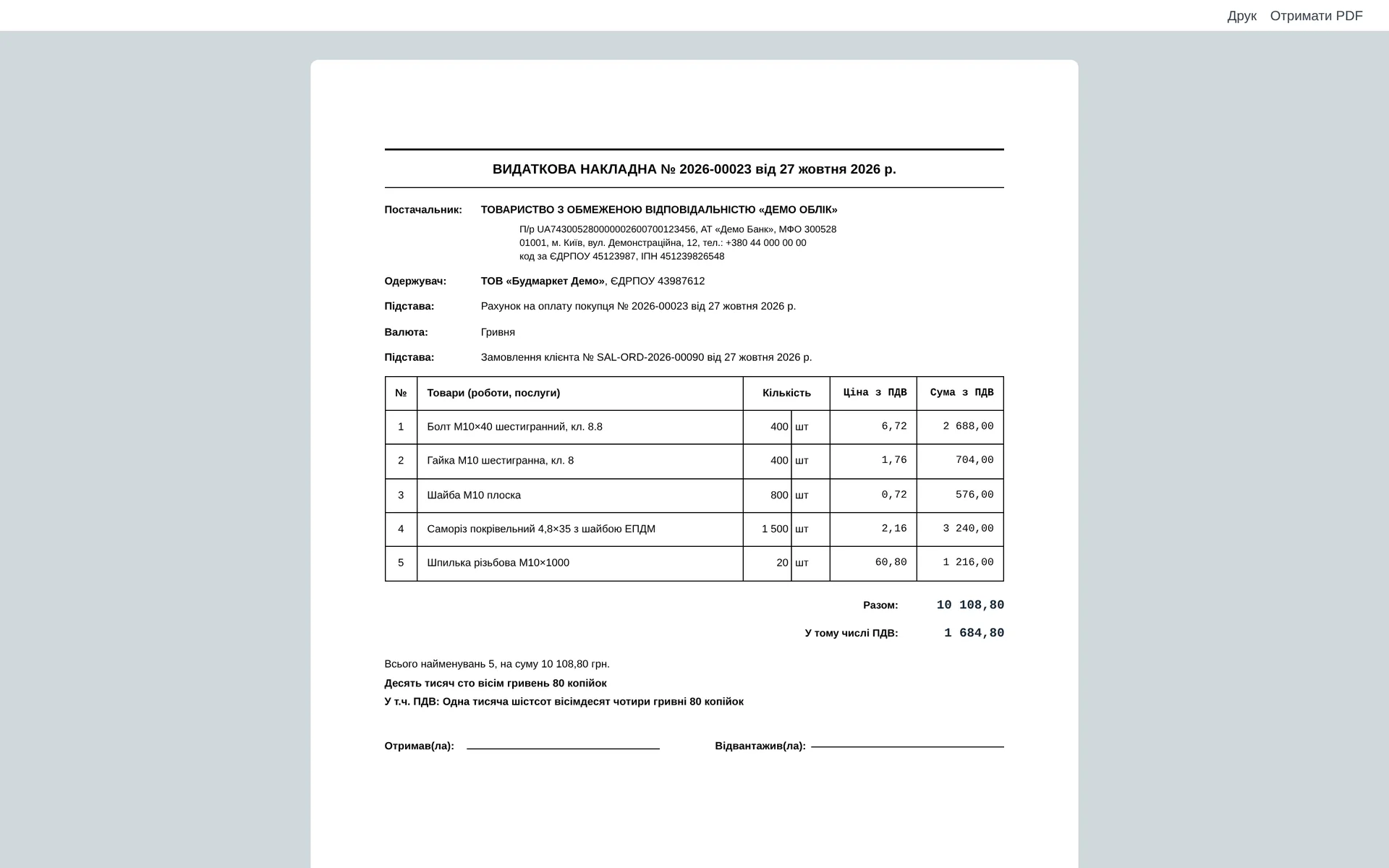
Delivery note: supplier and recipient details, price and amount with VAT, total and VAT in words, places for signatures.
02 / Chart of accounts
Ministry of Finance Order No. 291 instead of the English template
When you create a company with Ukraine as the country, the 291 chart template is first in the list. The sub-accounts already know their role in automatic postings.
- 01
9 classes, 51 accounts, 105 sub-accounts
From non-current assets (class 1) to operating expenses (class 9): fixed assets and depreciation, inventory, cash and settlements, equity, liabilities, income, expenses.
- 02
Default accounts
Cash 301, bank 311, customers 361, suppliers 631, goods 281, income 702, cost of sales 902, depreciation 131, exchange differences 945, rounding and write-offs 949. Documents post correctly from day one.
- 03
Taxes on their own sub-accounts
Tax settlements 641 and mandatory payments 642, income tax 981.
- 04
Your changes are not overwritten
Default accounts are set only when the company is created. Whatever the accountant changes later, the module does not touch.
- 05
Moving an existing company
A company that was kept on the standard chart or migrated from BAS, we move to the 291 chart. Posted documents do not change: balances and postings move to the new accounts, and the balances are reconciled.
- 06
Fiscal years
If the database has no previous calendar year, it is created automatically. Standard reports that look one year back by default open without errors.
03 / How it works
From a new company to the first document
- 01
You create a company
You choose Ukraine as the country and the template "Ukraine - Chart of Accounts (Ministry of Finance Order No. 291)". The account tree is built automatically.
- 02
Default accounts
Cash, bank, customers, suppliers, goods, income, cost of sales and write-off accounts are assigned to the company automatically.
- 03
Company details and VAT
On the company card you enter the EDRPOU code, IBAN, signatory and the "VAT payer" flag. It determines how invoices and delivery notes are printed.
- 04
First document
An invoice, delivery note or payment posts to the 291 chart accounts and prints on a Ukrainian form.
04 / Reference lists and formats
Forms and a product card that fit your business
Sales invoice, delivery note, invoice for payment: for a VAT payer: prices and amounts "incl. VAT" and the "Including VAT" line
Non-VAT payer: a sole proprietor (FOP) on the single tax: price and amount without VAT, no tax line, marked "Without VAT"
Colour and size: fields in the product card, in order, delivery note and invoice lines and in print, for clothing and footwear
DIN / ISO and coating: fields in the product card, list and filters, for fasteners and hardware
Switched on with a checkbox: industry fields are switched on in the stock settings; switching them off only hides the fields, the data is kept
Ukrainian login: the login page, code confirmation and the system's default language are in Ukrainian
Module scope
The module is included in every plan and cannot be switched off: the chart of accounts and postings rest on it. Interface translation, the NBU QR code and the mobile version come with the "Ukrainian interface" module. Tax invoices, the daily summary tax invoice and XML exchange with M.E.Doc, SOTA or Vchasno are in the "Tax invoices" module.
05 / About the module
Chart of accounts 291, reference lists and print formats
The Ministry of Finance chart of accounts No. 291 (classes 1-9, sub-accounts) is applied when a company is created, together with the default accounts: 361, 631, 311, 702, 902 and so on. Ukrainian print formats for invoices, delivery notes and acts of work. Included in every plan, cannot be switched off.
Area: Base package. The module is switched on and off for each company separately, with no per-seat licences.
06 / Questions and answers
About "Chart of accounts 291, reference lists and print formats"
Can I keep accounts under the 291 chart of accounts?
Yes. The template "Ukraine - Chart of Accounts (Ministry of Finance Order No. 291)" is selected when you create a company, and the cash, bank, customer, supplier, goods, income and cost of sales accounts are assigned automatically.
We already have a company on a different chart of accounts. What should we do?
We will move it to the 291 chart. Posted documents stay as they are: postings and balances move to the matching 291 accounts, and the balances before and after are reconciled.
We are a sole proprietor (FOP) without VAT. What will invoices and delivery notes show?
If the company card is not marked as "VAT payer", the forms show the price and amount without "incl. VAT", do not print the tax line and add the note "Without VAT".
Why the "Colour", "Size" and "DIN / ISO" fields?
For businesses with product variants (clothing, footwear) and for fasteners and hardware. For everyone else they just get in the way in tables, so they are hidden by default and switched on with a checkbox in the stock settings. Switching them off does not delete the data.
Can the default accounts be changed?
Yes, on the company card. The module sets them only when the company is created and does not overwrite later changes.
Do I have to pay extra for this module?
No. It is included in every plan and cannot be switched off, because your accounting rests on it.
Updated:
07 / Other modules
More modules on video
The same, on your data.
The screens were captured on a demo company. Send us a sample document or order and we will show this module on it.