01 / What the screens show
Screen by screen
Captions to the module screens: briefly what each one shows and why.
- 01
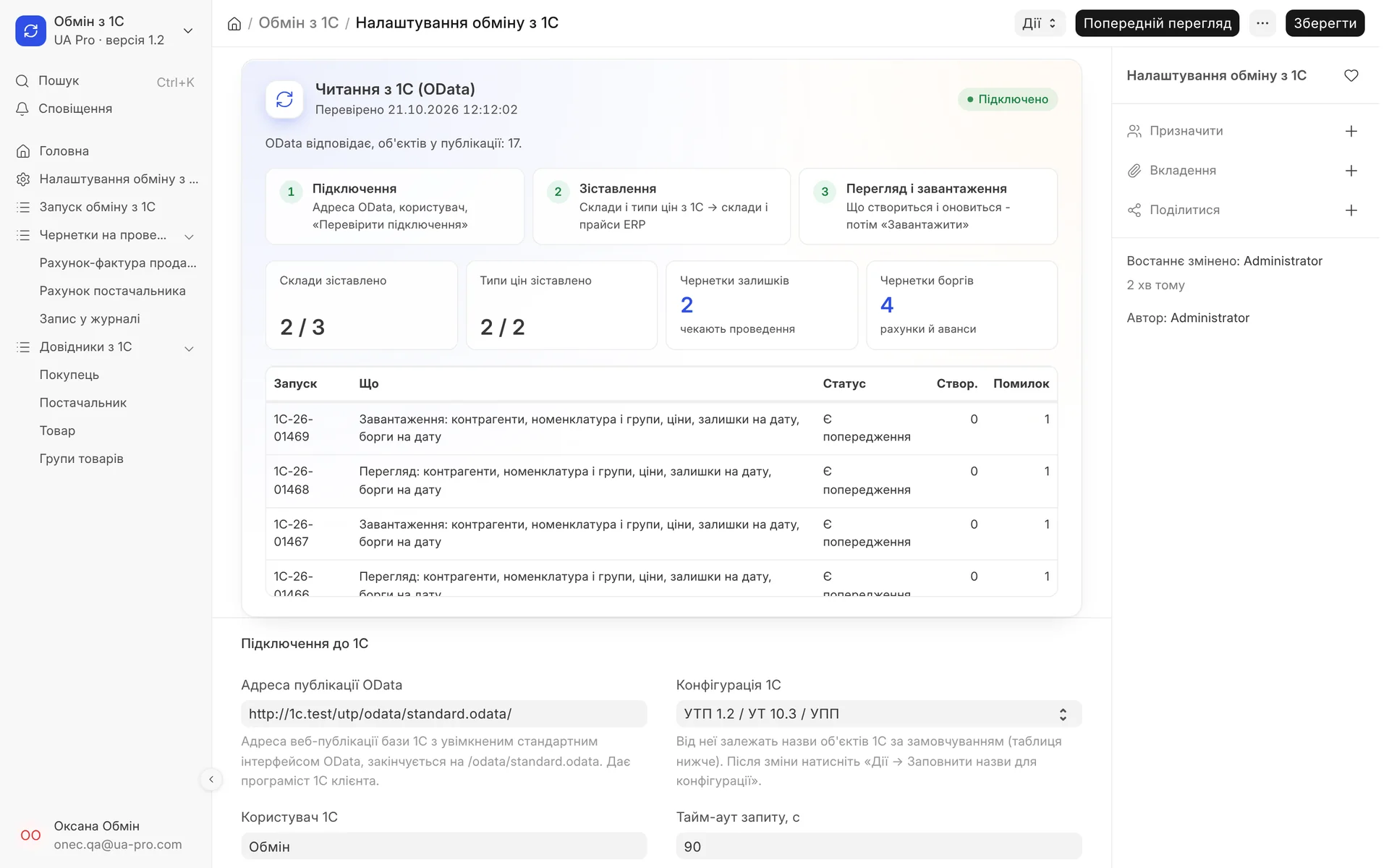
Migration settings: the connection to 1C, three steps, how many warehouses and price types are mapped, drafts of stock and debts, and the run log.
- 02
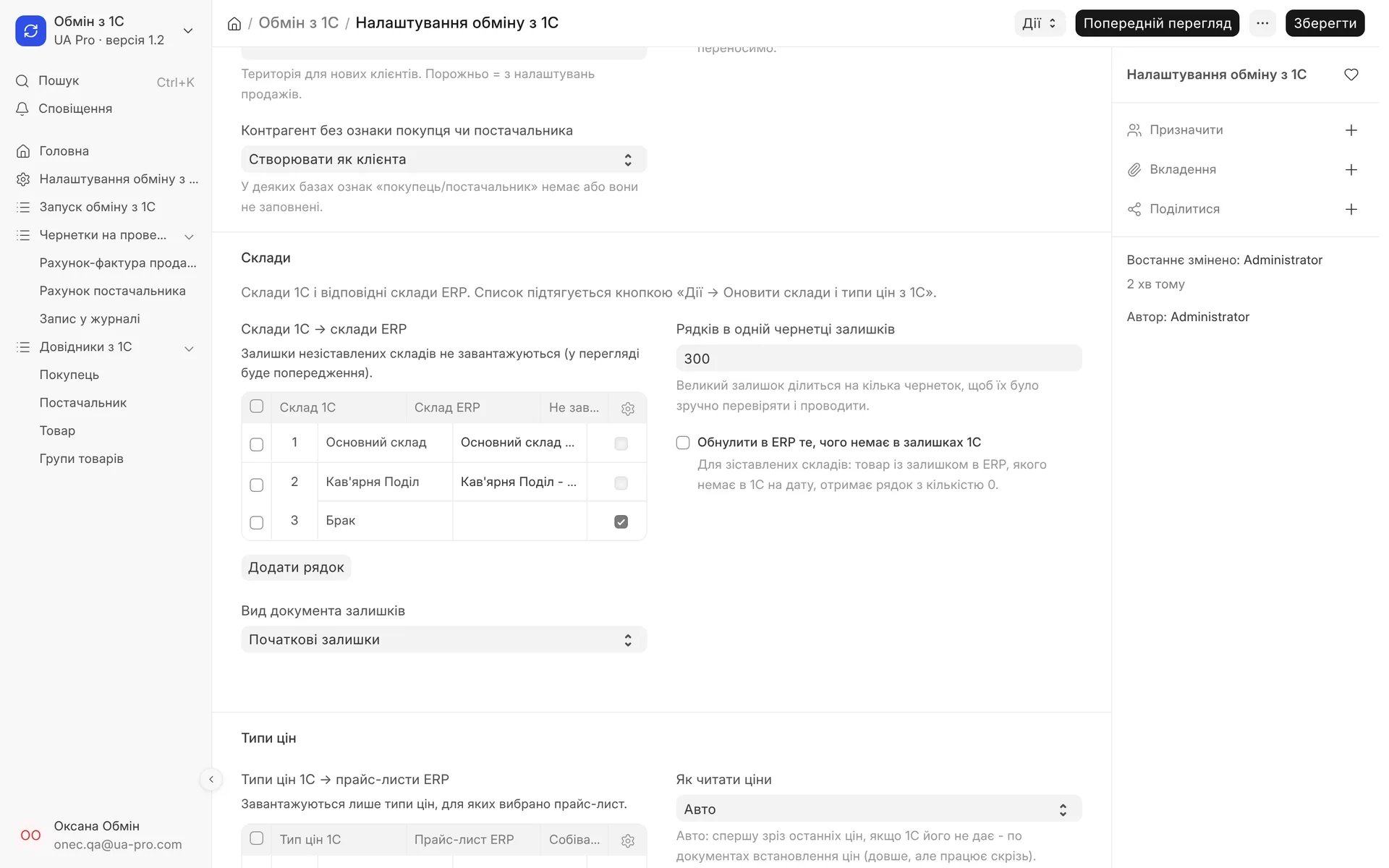
1C warehouses are mapped to ERP warehouses, an unneeded "Defects" warehouse can be skipped, and large stock balances are split into drafts by number of rows.
- 03
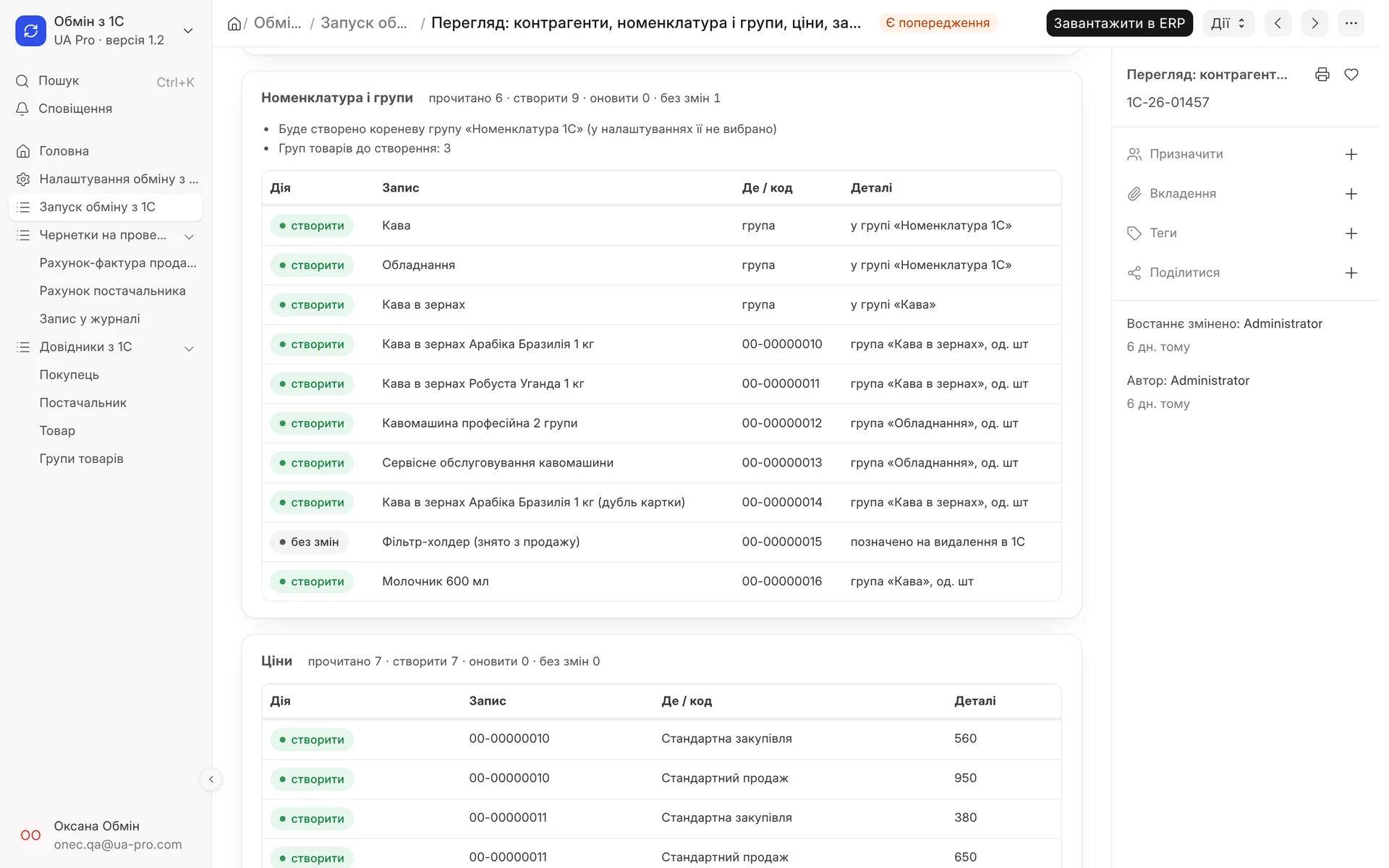
Preview before migration: groups and items that will be created, items without changes and prices that will go into price lists.
- 04
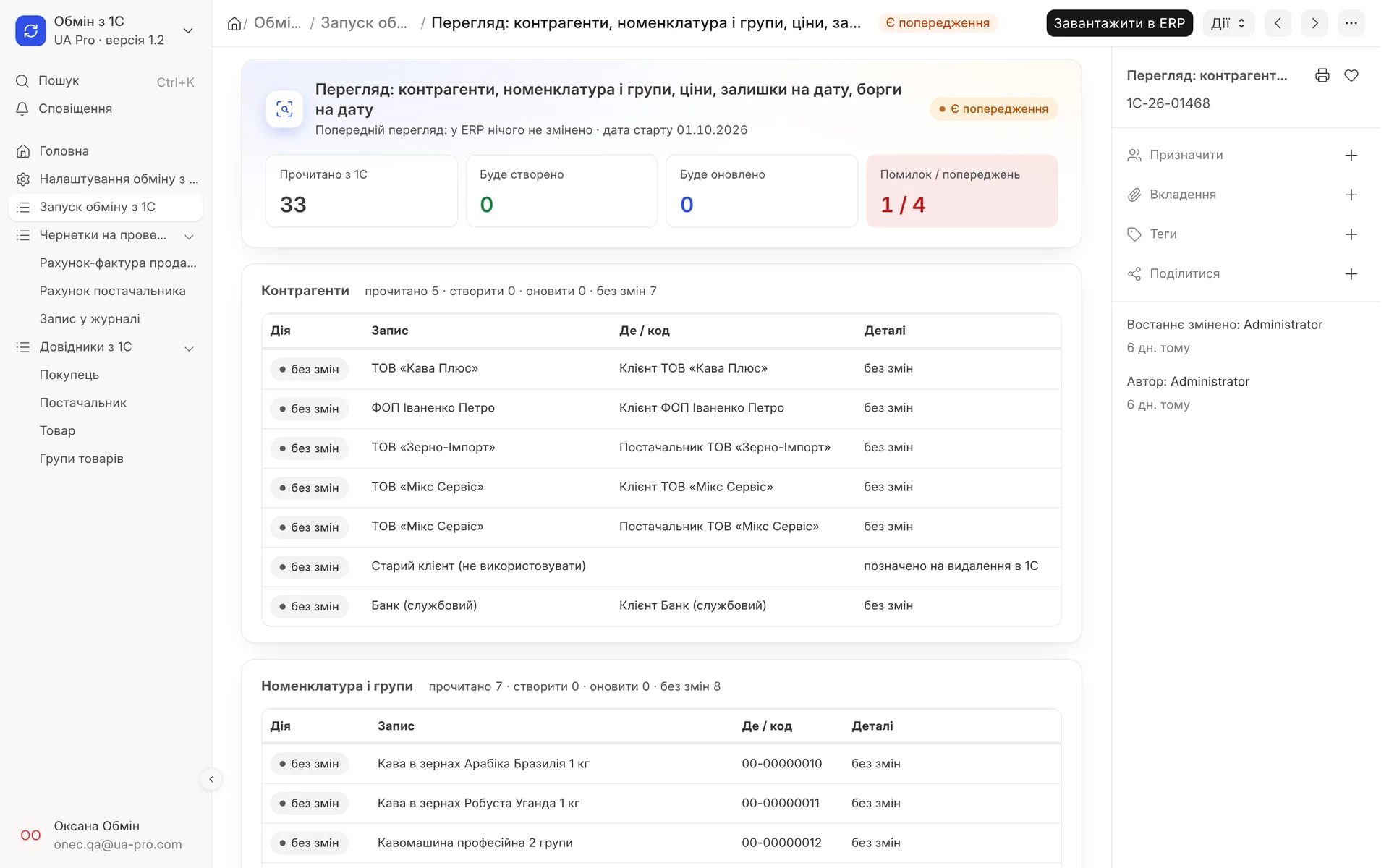
A repeat run read the same 33 records and created nothing: no duplicates appear, everything is marked "unchanged".
02 / What it transfers
Everything you need to start in the ERP
You choose what to read each time: you can transfer only master data now, and stock and debts later, at the start date.
- 01
Counterparties
They become customers and suppliers based on the "buyer" and "supplier" flags in 1C. If a counterparty already exists in the ERP, the module finds it by EDRPOU code or exact name and does not duplicate it.
- 02
Items and groups
Goods and services with units of measure, and 1C folders become the item group tree. The item code in the ERP equals the article number from 1C, and if there is no article number, the 1C card code is used.
- 03
Prices
The latest valid price of each item for the 1C price types you select. You map each price type to your own ERP price list.
- 04
Stock at the start date
Quantities at the beginning of the start day for the mapped warehouses. Cost is taken from the price type you mark, usually the purchase price.
- 05
Debts at the start date
Who owes whom: customer and supplier debts, advances and overpayments. The module works out the side of the debt from the sign of the amount.
- 06
Drafts, not postings
Stock and debts arrive as draft opening documents. Large stock is split into several drafts so they are easy to check and post.
03 / How it works
From connection to posted stock
- 01
Connection
You enter the 1C web publication address, user and password, the company and the start date. The connection check shows how many records are in 1C and what is missing.
- 02
Mapping
One button pulls warehouses and price types from 1C. You choose which ERP warehouses and price lists they go to, and mark warehouses you do not need as "do not import".
- 03
Preview
The module reads 1C and the ERP in the background and changes nothing. You see what will be created, updated or skipped, plus all warnings.
- 04
Import
You start the import from a finished preview. If you changed the company or the start date after the preview, the system will ask you to run a new preview.
- 05
Check and posting
The accountant opens the created stock and debt drafts, reconciles and posts them. Every run is saved in the exchange log.
04 / No duplicates, no surprises
A repeat run updates, it does not multiply
Link to 1C: every transferred record remembers its card in 1C, so a repeat read updates exactly that record
Posted data stays untouched: if stock or debts for this date are already posted, no new draft is created, and an amount difference shows as a warning
Manual records stay intact: a repeat read does not rename customers and items entered in the ERP by hand
Marked for deletion: not transferred by default, can be switched on in the settings
Password encrypted: it never appears in logs or messages; we recommend a separate 1C user with read-only rights
Run log: what was read, created and updated, what errors occurred and which drafts the run created
05 / 1C configurations
UTP, UT, UPP, BAS and others
Object and field names differ between 1C configurations. For the standard ones they are filled in in advance and can be edited in the form.
UTP 1.2 / UT 10.3 / UPP: the main option, tested on a live 1C database
UT 11 / BAS UT / KUP: names are filled in in advance, the connection check will show whether everything was found
Other configuration: object and field names are entered manually, and you can set a fallback for each
Hints when names differ: if 1C has no required object, the module says so, and for a missing field it shows which fields 1C returns
What is not included yet
The module only reads 1C: writing to 1C (customers and orders from the ERP) will come in the next version. Item characteristics are summed into one item, stock of items with serial numbers and batches is entered manually, currency amounts are taken as is, and document history and barcodes are not transferred. To connect, you need to allow the UA Pro server IP address in your 1C firewall.
06 / About the module
1C (OData), read-only
Migration from 1C without manual exports: counterparties, items with groups, prices, stock and debts as of the start date. First a preview, then the import; stock and debts become drafts that the accountant posts. UTP 1.2 / UT 10.3 / UPP, UT 11 / BAS.
Area: Base package. The module is switched on and off for each company separately, with no per-seat licences.
07 / Questions and answers
About "1C (OData), read-only"
Can the module break anything in our 1C?
No. The module only reads data through the standard OData interface and writes nothing to 1C. For peace of mind, it is better to create a separate 1C user with read-only rights.
What do we need on our side to connect?
A web publication of the 1C database with the OData interface enabled, a user and password, and a firewall rule allowing our server's IP address. The connection check will show right away whether everything is set up.
Will stock and debts appear in the books right away?
No, they arrive as draft opening documents at the start date. The accountant checks and posts them, so nothing gets into the books without their decision.
We have already entered some customers in the ERP. Will there be duplicates?
No. The module looks for an existing counterparty by its link to 1C, then by EDRPOU code, then by exact name. The record it finds is updated, not created a second time.
Can we run the transfer several times?
Yes. For example, transfer master data in advance, and stock and debts on the start day. A repeat run updates what has changed and does not create duplicates.
We use BAS or UT 11. Will it work?
Yes, for UT 11, BAS UT and KUP the object names are filled in in advance, and for other configurations you can enter them manually. The connection check will show what is missing before the transfer.
Updated:
08 / Other modules
More modules on video
The same, on your data.
The screens were captured on a demo company. Send us a sample document or order and we will show this module on it.