01 / What the screens show
Screen by screen
Captions to the module screens: briefly what each one shows and why.
- 01
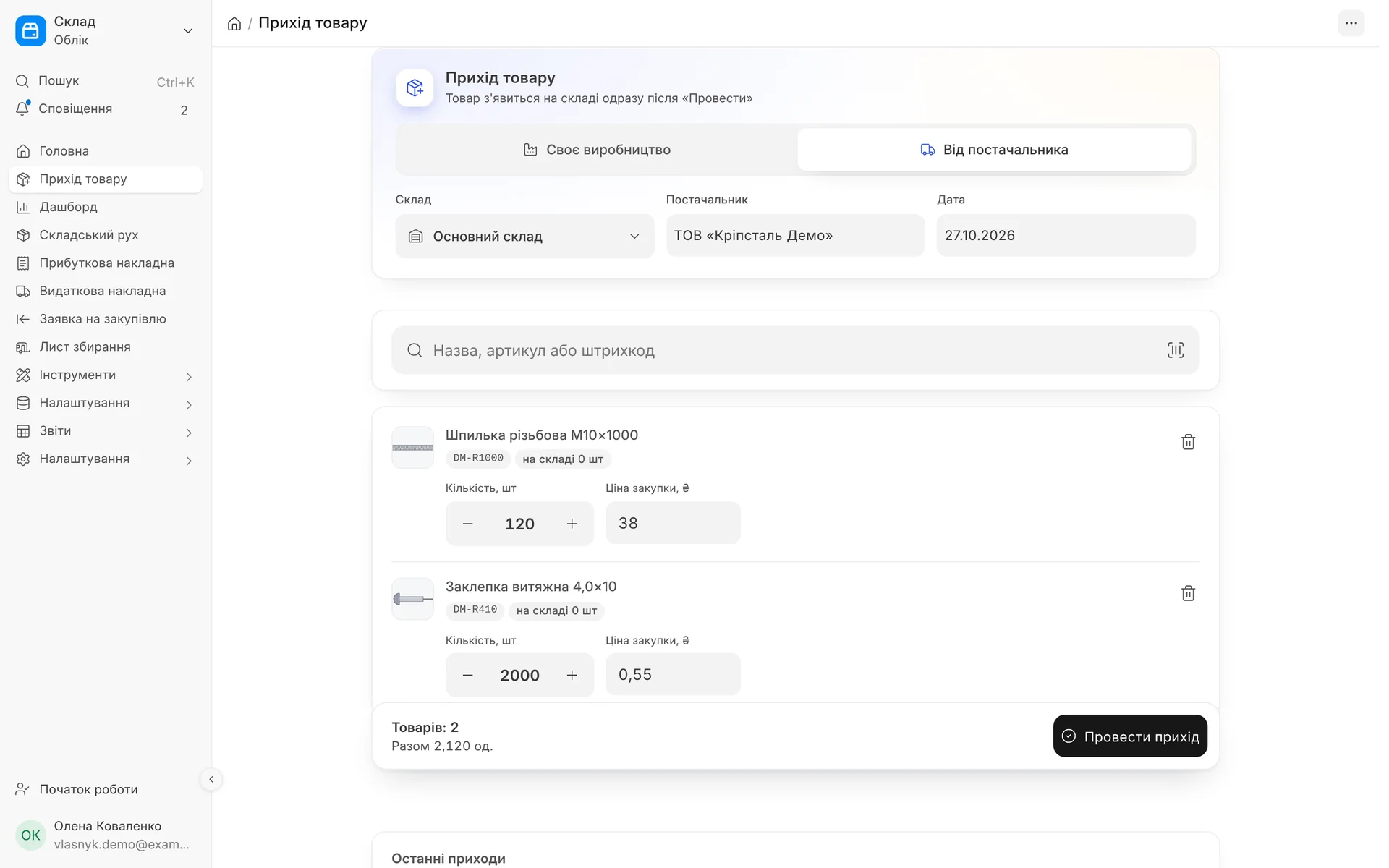
The "Goods receipt" screen: a receipt from a supplier into the warehouse, items, quantity and price in one list, without extra fields.
- 02
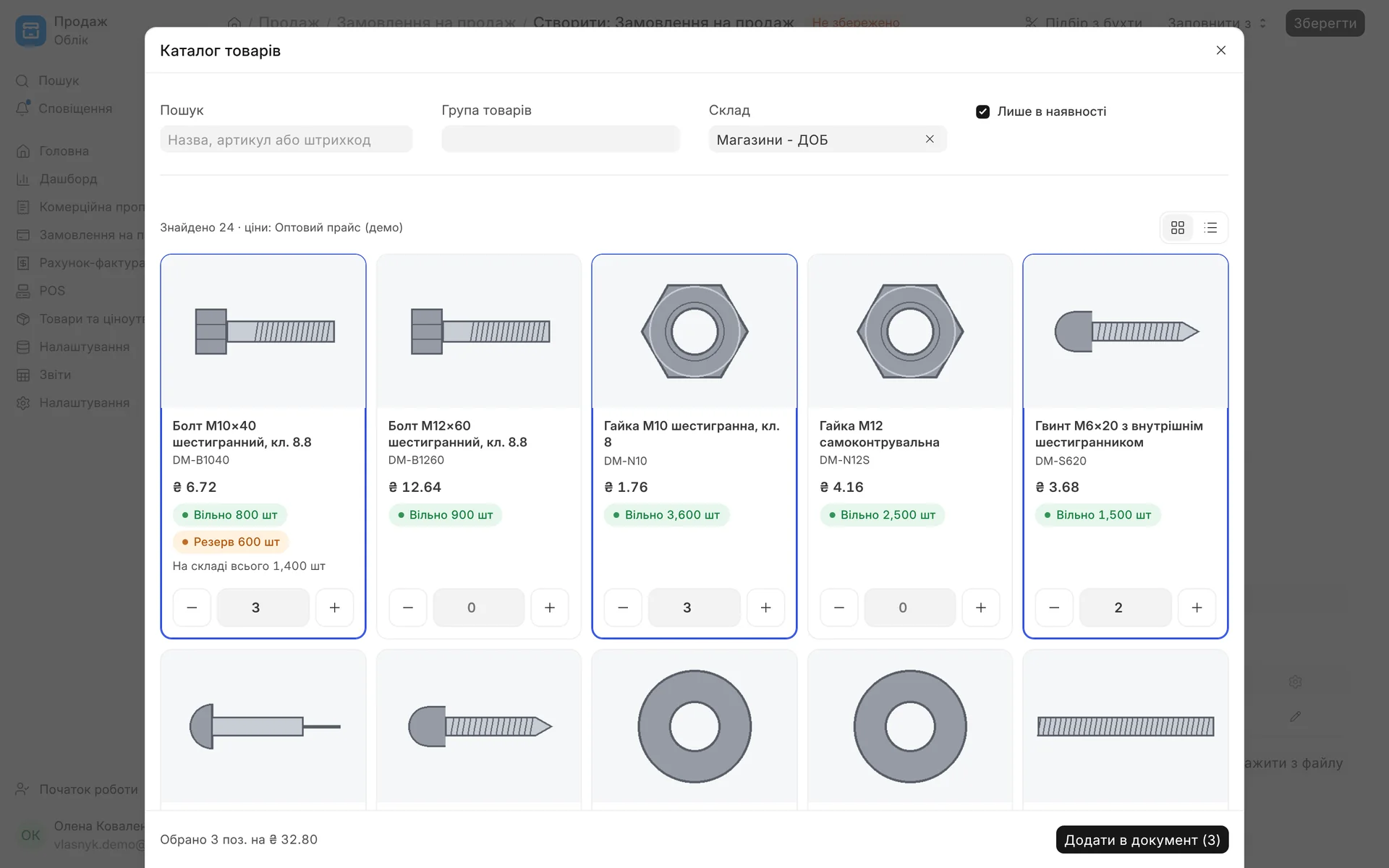
Item catalogue in the order: price from the customer's price list, free stock and reserve, an "In stock only" filter, quantity with + and − buttons.
- 03
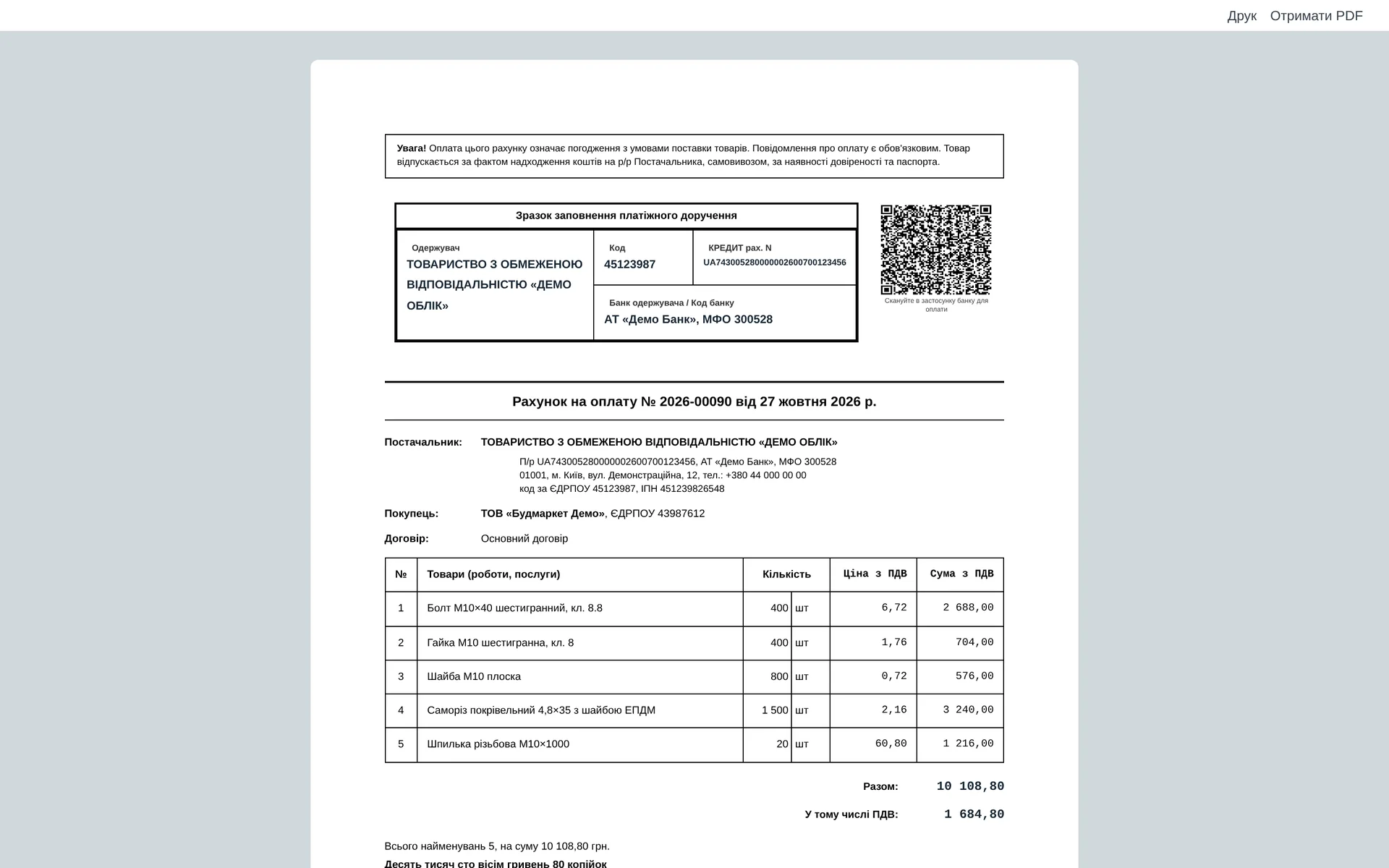
An invoice with an NBU QR code: the customer scans it in their banking app and pays without entering the details by hand. Prices include VAT, with the total and the amount in words.
- 04
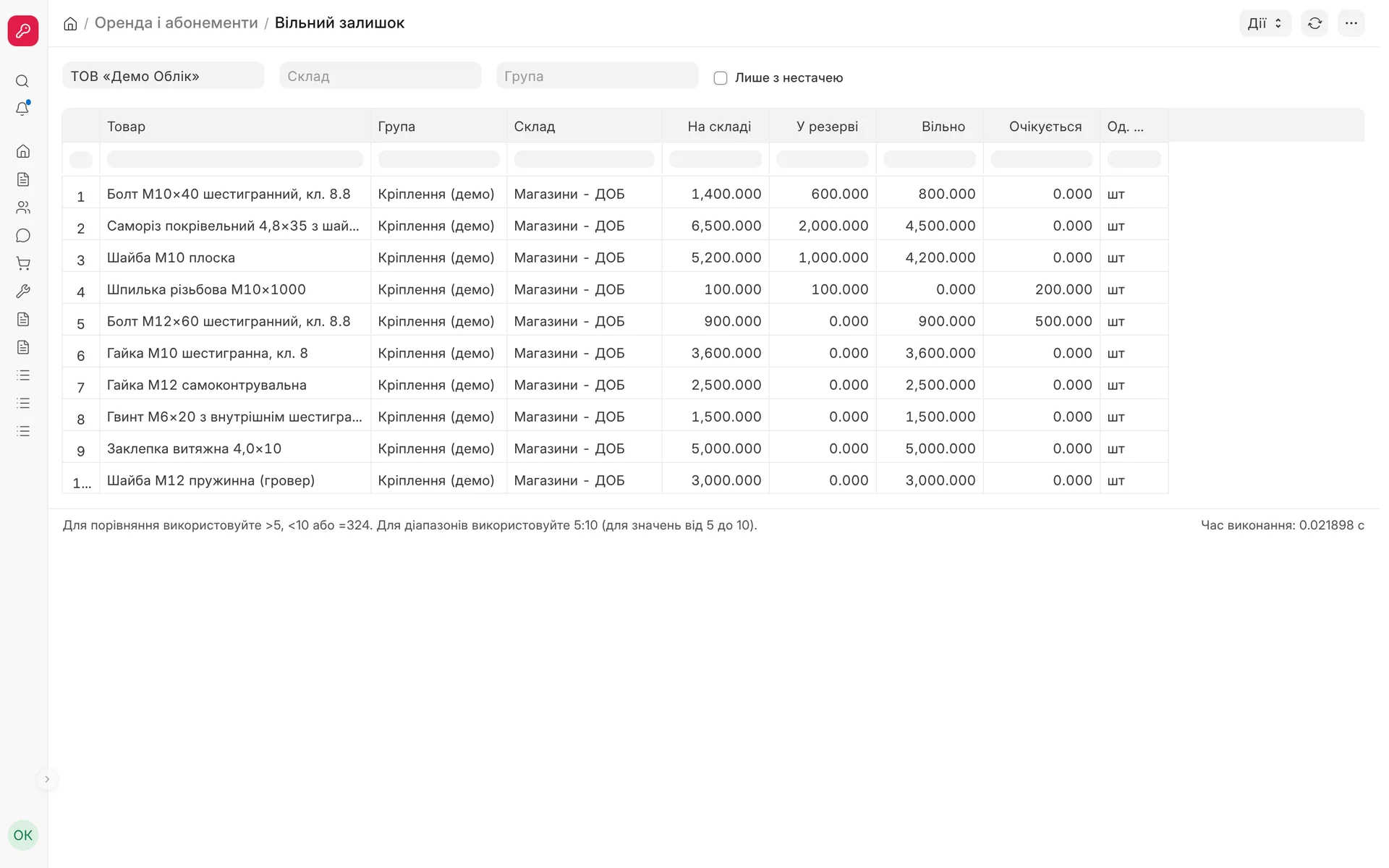
"Free stock" report: how much is in the warehouse, how much is reserved for orders, how much is free and how much is expected from suppliers.
02 / Language and terms
In Ukrainian, in the words of the accountant and the storekeeper
Not machine translation, but the terms people got used to in 1C and BAS. What the system shows in English out of the box, we translate separately.
- 01
Interface and reference lists
Menus, forms, lists, reports, messages and statuses in Ukrainian. The status "Not invoiced" instead of the ambiguous "To pay", "Goods receipt" and "Write-off" instead of "Material Issue".
- 02
PDV instead of VAT
The tax account and the "PDV 20%" (VAT) line in receipts, invoices and print formats, not the English "VAT @ 20.0" from the initial setup.
- 03
Transaction in the stock ledger
Next to the document you see the transaction in plain language: receipt, write-off, transfer, shipment, return, stock take. The column is included in exports too.
- 04
Charts and calendar
Month and quarter labels on desk charts and the calendar in date fields are in Ukrainian.
- 05
Document order
Lists are sorted by document date, newest on top. After migration from 1C or BAS, documents do not get mixed up.
- 06
No. in 1C/BAS
The document number from the previous accounting system is kept and can be found in global search and in the list filter.
03 / Print formats
7 Ukrainian forms with company details and the amount in words
The formats are installed on every new database. If you have already edited your own format, an update does not overwrite it.
Invoice for payment: the default order print, with an NBU QR code
Sales invoice: from a customer invoice, with an NBU QR code
Delivery note: from a shipment or straight from an invoice
Goods received note: supplier, recipient, basis, warehouse, "Handed over / Received" signatures
Payment entry and bill of materials: for payments and production specifications
Amount in words and numbers: "Two million six hundred… hryvnias 00 kopiykas", numbers in the format "1 230,00"
With or without VAT: for a non-VAT payer the forms say "Without VAT" and do not print the tax line
Account for payment: in an order you can choose which company account to pay to; the QR is generated only with a valid IBAN
04 / Useful screens
What a standard ERP is missing
The screens do not keep separate records: they create and read the system's regular documents, with the user's permissions.
- 01
Goods receipt
A simple screen for a phone and a computer: your own products or goods from a supplier, search by name, SKU or barcode, a camera scanner. Tapping the button again does not create a second document.
- 02
Product catalogue
In a quotation, order, invoice and delivery note: photo, price from the price list, stock and free stock by warehouse, an "In stock only" filter, as tiles or a list.
- 03
Stock and reservations in the lines
The product table shows the stock in the warehouse and how much is already reserved. The "Split across warehouses" button divides a line that is short between the warehouses that have the product.
- 04
What to buy
A purchase suggestion based on actual consumption for the selected period, taking into account lead time, safety stock and what is already ordered. The selected lines become a purchase request.
- 05
Free stock
A report: in the warehouse, reserved for orders, free to sell and expected from suppliers. A "Shortages only" filter.
- 06
Batch traceability
One button on a batch: what it was made from and from which suppliers, which product batches it went into and which customers it was shipped to. Print and CSV for a product recall.
05 / How it works
Goods receipt from a phone in a minute
- 01
Receipt mode
You choose "Own production" or "From a supplier". The warehouse is filled in from the last receipt.
- 02
Products
You search by name, SKU or barcode, or scan with the camera. With the "Supplier document recognition" module you can take a photo of a delivery note or a handwritten note: the lines are matched automatically, and doubtful ones are marked "check".
- 03
Batches and cost price
For products tracked by batch, the batch is created automatically (product and date, shelf life from the product card). If no price is given, the cost price is taken from the product card.
- 04
Posting
The system creates a goods receipt or a supplier receipt and posts it on your behalf. The cost price in the product card is updated from the latest receipt.
06 / On a phone
Forms, lists and reports for a mobile screen
Product tables as cards: the full product name on top, all columns with labels below, no cut-off amounts
Main action at the bottom: a large button at the bottom of the screen, menus and dialogs open as a bottom sheet
Fields without clutter: read-only fields are shown as text, empty ones are hidden
Reports: columns fit the screen width, the first filters are visible at once, the rest under "More filters"
Document preview: the product or document card is centred on the screen, not off its edge
Computer unchanged: on a large screen everything looks as usual
What is included and what is not
The module is included in every plan and cannot be switched off: it is the basis of the interface. The chart of accounts No. 291 and reference lists come with the "Chart of accounts 291, reference lists and print formats" module, tax invoices and registration in the Unified Register of Tax Invoices (ERPN) are in the "Tax invoices" module, and recognition of delivery note photos is in the "Supplier document recognition" module.
07 / About the module
Ukrainian interface
The whole interface in Ukrainian: menus, forms, reports, messages and the terms accountants are used to. Included in every plan, cannot be switched off.
Area: Base package. The module is switched on and off for each company separately, with no per-seat licences.
08 / Questions and answers
About "Ukrainian interface"
Do I have to pay extra for the Ukrainian interface?
No. The module is included in every plan, is installed on the database from day one and cannot be switched off.
Can I change a print format to suit my needs?
Yes. Company details, the signatory, the signature and the stamp are filled in on the company card, and the format itself can be edited. Module updates do not overwrite your changes.
How does the QR code on the invoice work?
The invoice for payment and the sales invoice carry a QR code made to NBU rules. The customer scans it with the camera or the bank app, and the details, amount and payment purpose are filled in automatically. The QR is generated only with a valid IBAN and is not printed on an invoice that is already paid.
We are not VAT payers. What will the documents show?
If the company is not marked as "VAT payer", the forms show the price and amount without "incl. VAT", do not print the tax line and add the note "Without VAT".
Is it convenient to work from a phone?
Yes. Forms, lists, reports and dialogs have a mobile layout: product tables as cards, the main action as a large button at the bottom. Goods receipt from a phone is done on a separate simple screen with a barcode scanner.
After 1C we have our own document numbers. Will they be kept?
Yes. The number from the previous system is kept in the "No. in 1C/BAS" field, and global search and the list filter search by it.
Updated:
09 / Other modules
More modules on video
The same, on your data.
The screens were captured on a demo company. Send us a sample document or order and we will show this module on it.