01 / What the screens show
Screen by screen
Captions to the module screens: briefly what each one shows and why.
- 01
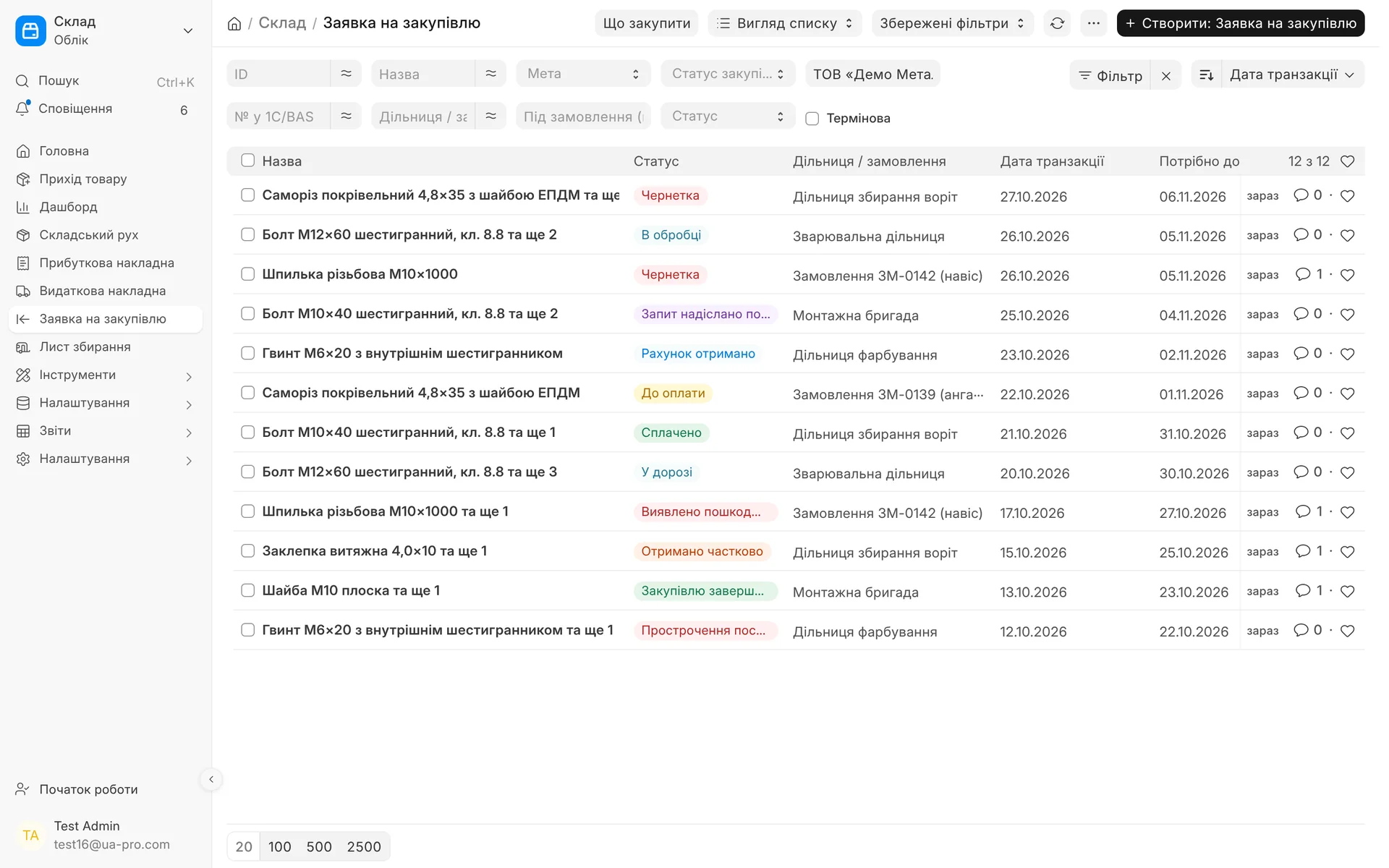
Request list: the name shows what we are buying, next to it the workshop or order and a coloured purchasing status. You see at once what is paid, what is in transit, and what is overdue or arrived damaged.
- 02
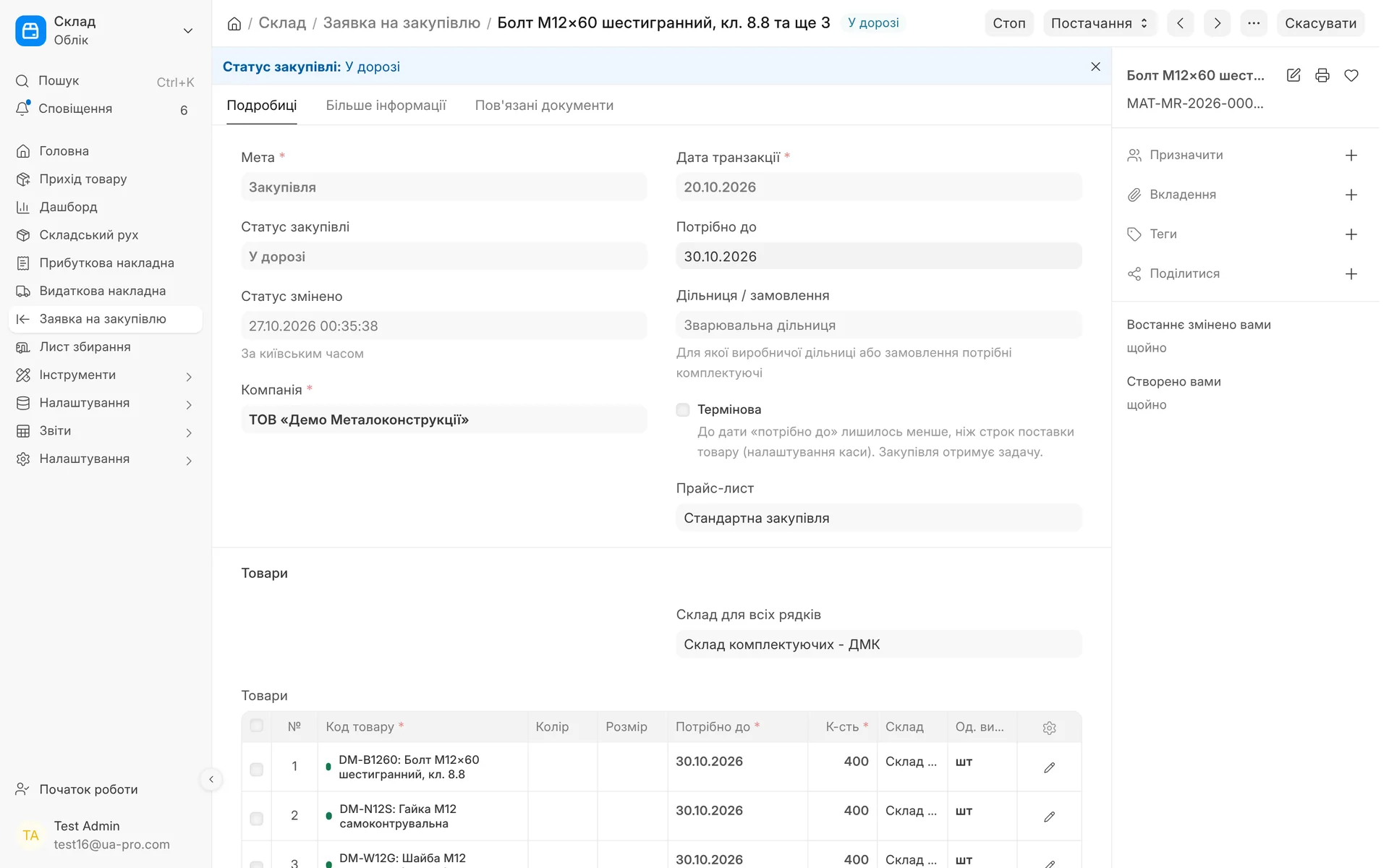
A welding shop request: the purchasing status "In transit" at the top of the card and the time it changed. The "Supply" menu lets you return the request for clarification or cancel it.
- 03
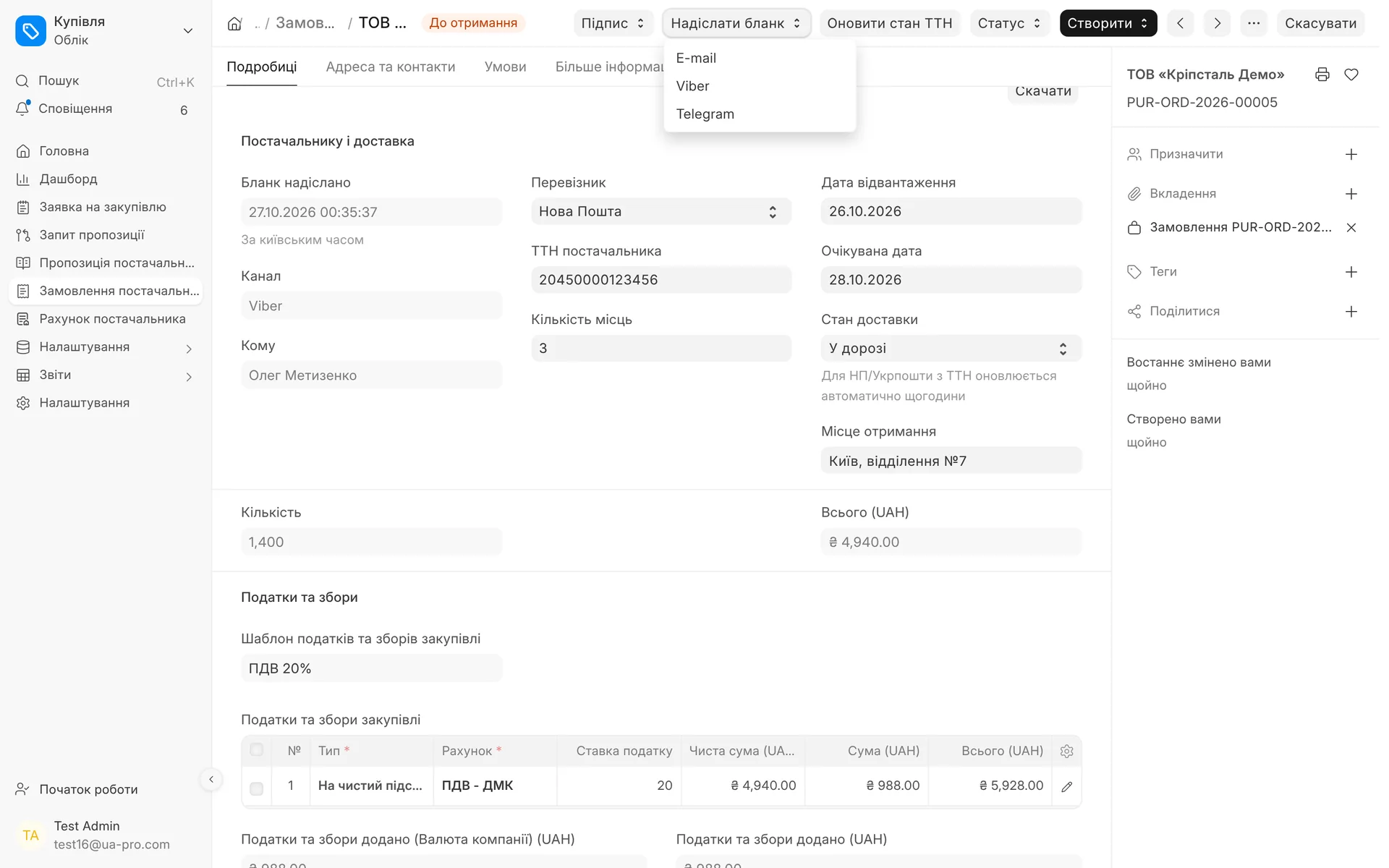
Purchase order, "Supplier and delivery" block: when and through which channel the form was sent, the carrier, the supplier's waybill, number of packages, dates and delivery status. The form can be sent by e-mail, Viber or Telegram.
- 04
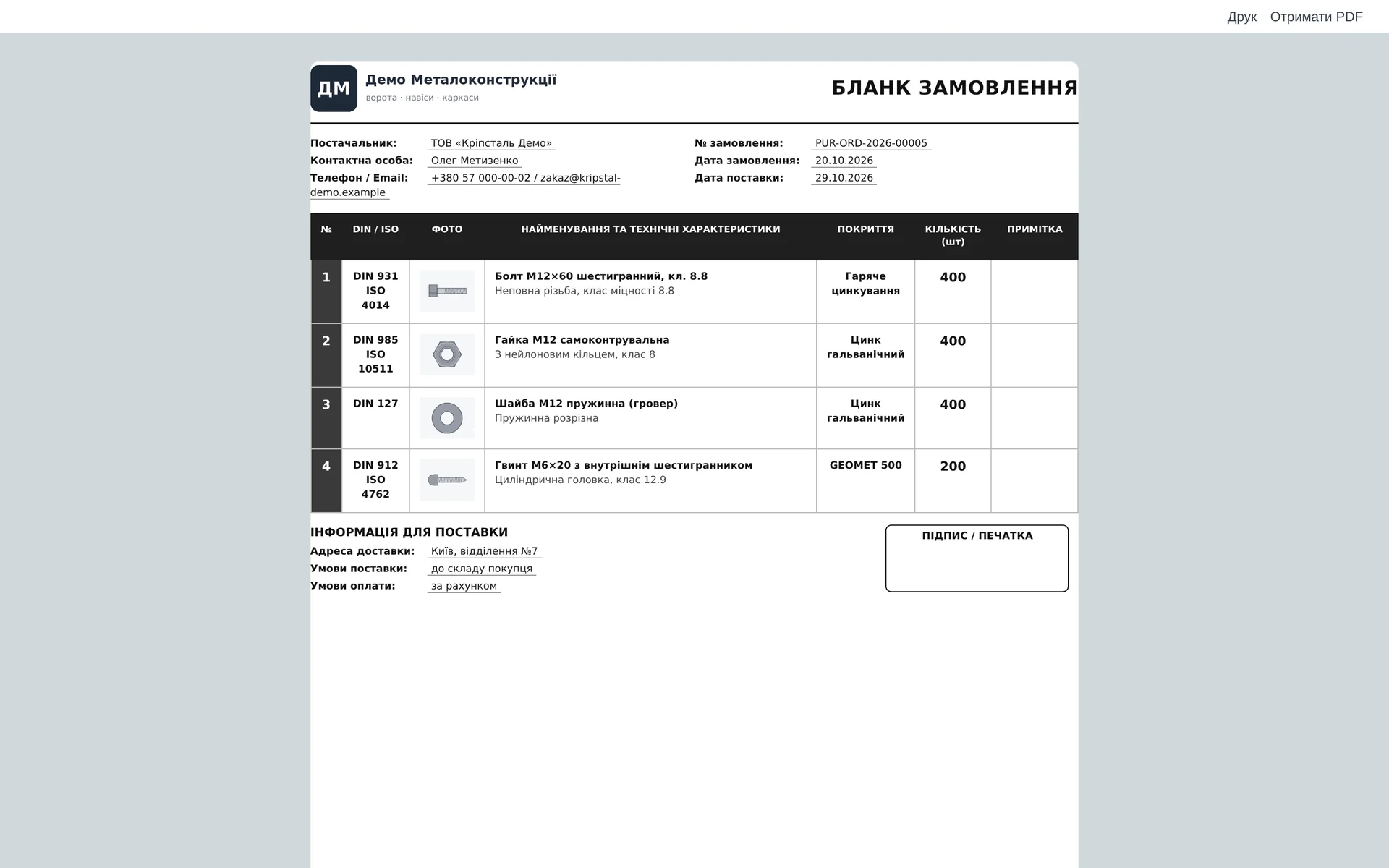
Purchase order form for the supplier: DIN / ISO standard, photo, name and specifications, coating and quantity for each item, and at the bottom the address, delivery and payment terms and a place for a signature.
- 05
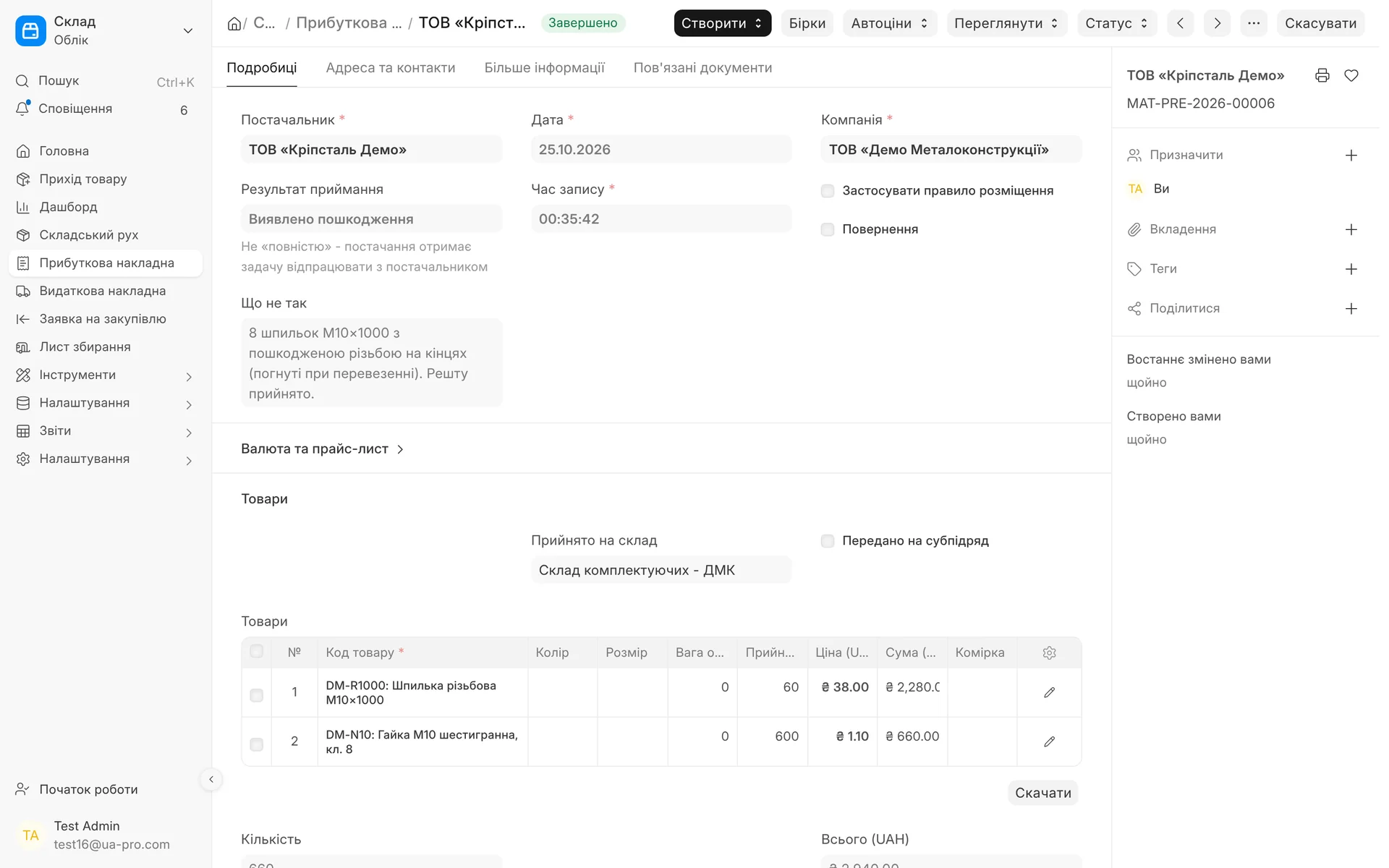
Receipt from a supplier: the storekeeper sets the result to "Damage found" and writes what is wrong. A task to resolve it with the supplier is assigned to purchasing right away.
02 / How it works
One request, one status from start to finish
- 01
Request from the shop floor
The author states what is needed and for which section or order. The request title is built from the item names, so the list shows what is being bought. If something is unclear, purchasing returns the request with the question "Clarification needed" (Потрібне уточнення), and the author gets a notification.
- 02
Order and form
Purchasing takes the request on and places an order with the supplier. The PDF form goes out as an email attachment or is saved for forwarding in Viber or Telegram, and the time and channel of sending are recorded.
- 03
Invoice, approval, payment
The received invoice, its approval and payment move the request on their own to "Invoice received", "Pending approval", "To be paid", "Paid". After payment, the supplier can get an email asking to confirm receipt of funds and the shipment date.
- 04
Delivery and receipt
In the order you enter the carrier and the supplier's waybill. When the goods arrive, the request author and purchasing get a notification. The storekeeper records the result on the receipt, and the request closes with the status "Purchase completed".
03 / Statuses
The status is calculated from documents, not set by hand
Only human states before the order are set by hand: clarification, supplier did not confirm, cancelled. The module determines everything else itself.
- 01
Before the order
New request, Clarification needed, In progress, Request sent to supplier, Supplier did not confirm.
- 02
Invoice and money
Invoice received, Pending approval, Not approved, To be paid, Approved for payment, Paid.
- 03
Delivery
Shipped, In transit, Awaiting receipt. If the planned delivery date has passed and the goods have not arrived, the request gets "Delivery overdue".
- 04
Receipt
Partially received, Mismatch found, Damage found, Return to supplier, Purchase completed.
- 05
Colour in the list
In the request list each status has its own colour, and the filter by status and section shows what is stuck right now.
- 06
Daily recalculation
Once a day the module recalculates all open requests, so an overdue status appears even without new documents.
04 / Supplier order form
An order form any supplier will understand
Line items with photos: number, DIN or ISO standard, product photo, name and specifications, coating, quantity, note
Details of both parties: company logo, supplier, contact person, phone and email
Delivery terms: delivery address, delivery and payment terms, space for a signature and stamp
Component card: the item gets "DIN / ISO" and "Coating" fields that you can search and filter by
05 / Receipt and delivery
What arrived and what did not is visible right away
- 01
Receipt result
The storekeeper chooses: received in full, partially, mismatch or damage, and writes what is wrong. Purchasing gets a task to sort it out with the supplier.
- 02
Delivery in parts
If a receipt does not fully cover the order, it gets "Partially received" automatically. A task for each partial delivery can be enabled in the settings.
- 03
Supplier's waybill
Carrier, waybill number, number of packages, shipment date and expected date. For Nova Poshta and Ukrposhta the delivery status updates every hour, and there is an "Update waybill status" (Оновити стан ТТН) button.
- 04
Without email set up
If outgoing email is not connected yet, the email to the supplier is saved in the document history marked "not sent", and the process does not stop.
Module limits
The module tracks the purchasing status and communication with the supplier, but it does not choose a supplier or compare prices. Invoice approval works when approval rules are set up in the system. Automatic waybill tracking needs a connected carrier account in the shipping module, for other carriers the delivery status is set manually.
06 / About the module
Component purchasing
Requests from workshops, a purchase order form for the supplier, invoice and approval, payment with a letter to the supplier, the supplier's waybill and goods receipt with statuses.
Area: Manufacturing. The module is switched on and off for each company separately, with no per-seat licences.
07 / Questions and answers
About "Component purchasing"
Who can create a purchase request?
Any employee with access to requests, for example a section foreman. Only purchasing can take it on: the author saves the request, and it appears in the list with the status "New request".
Do I need to update the status manually?
No. The status is calculated from the order, invoice, payment, waybill and receipt. Only "Clarification needed", "Supplier did not confirm" and cancelling the request are set manually.
How do I send an order to a supplier who only works in Viber?
Click "Send form" (Надіслати бланк) and choose Viber or Telegram. The system saves the PDF form in the order, you forward it to the supplier, and the channel and time of sending are recorded in the document.
What happens if not everything arrived or some of it is defective?
The storekeeper chooses "Partially received", "Mismatch found" or "Damage found" on the receipt and describes the problem. The request gets this status, and purchasing gets a task to sort it out with the supplier.
Does the system notify the supplier about payment?
Yes, if you enable "Email to supplier after payment" in the purchasing settings. After payment the supplier gets an email with the invoice number, the amount and a request to confirm the shipment date. This email is off by default.
Do I have to pay extra for the module?
No, the module is included in the plan and enabled by default. If you do not need purchasing, it can be turned off.
Updated:
08 / Other modules
More modules on video
The same, on your data.
The screens were captured on a demo company. Send us a sample document or order and we will show this module on it.